The agent crew
VideoAgents works like a studio crew. 119 specialist agents, grouped into 17 departments, each do one kind of job, such as writing dialogue, designing costumes or planning camera moves. The Workflow Orchestrator hands out the work and you approve the results.
The crew in the console
The left column of the console lists the agents by department. Click a department to open it, and click an agent to open its chat.
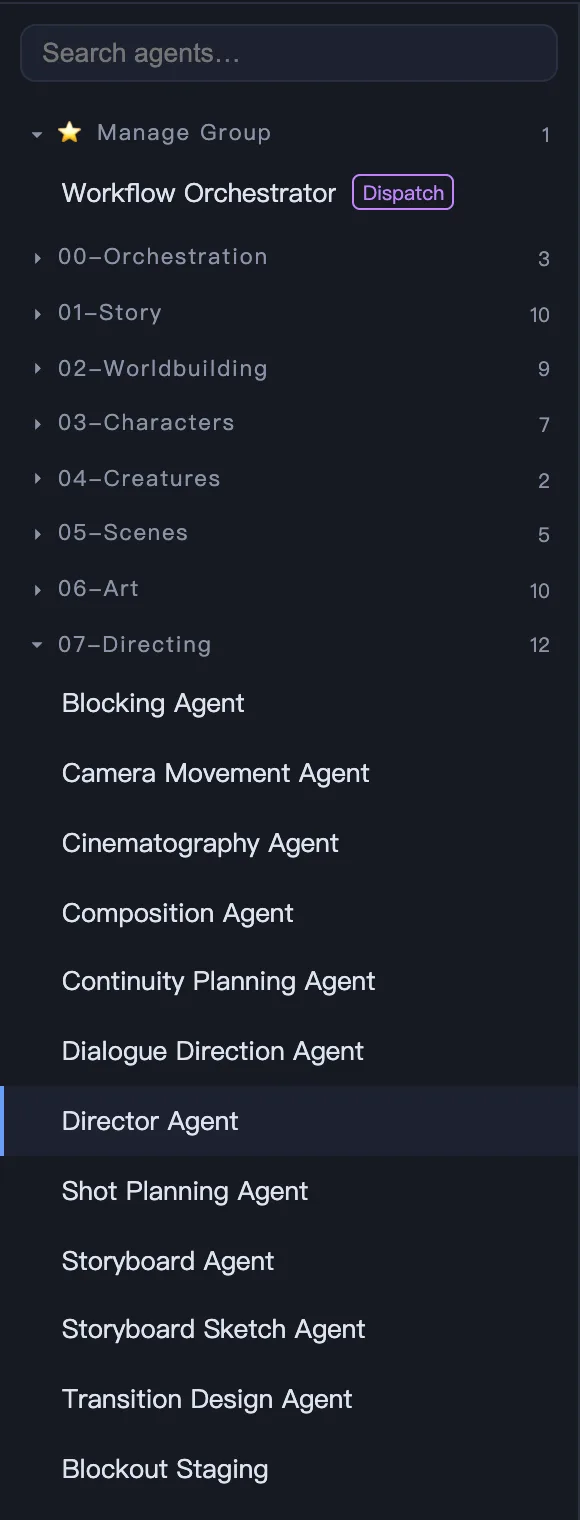
The ⭐ Manage Group at the top holds the Workflow Orchestrator, marked Dispatch. It is the agent you talk to most. Some buttons and messages call it the Producer. The list shows only the agents your project's type uses: a film project shows departments 00 to 12.
The departments
| Department | Agents | What it does |
|---|---|---|
| 00-Orchestration | 4 | Runs the production. The Workflow Orchestrator plans and dispatches the work and raises sign-offs; the Memory / Bible Agent is the only one that writes the world bible; the Evaluation Agent scores work against quality rubrics; the Reviser makes the changes you ask for on preview pages. |
| 01-Story | 10 | Reads the novel and turns it into episodes: novel parsing, story structure, events, story timeline, episode planning, screenplay, dialogue rewriting, narration, hooks and pacing. |
| 02-Worldbuilding | 9 | Writes the world bible: world overview, timeline, geography, religion, culture, politics, economy, magic or cultivation systems, and a dictionary of terms. |
| 03-Characters | 7 | Defines each character: the character index, appearance, personality, relationships, growth, voiceprint and dialogue style. |
| 04-Creatures | 2 | Creatures and mounts. |
| 05-Scenes | 5 | Scenes, environments, architecture, lighting and scene modeling. |
| 06-Art | 10 | The look of the series: art direction, concept art for characters, environments, creatures and costumes, costume and prop cards, colour script, aspect ratio, and image retouching on the Canvas. |
| 07-Directing | 12 | Turns each episode's screenplay into shots: director's plan, storyboard and sketches, shot planning, camera movement, composition, cinematography, blocking, continuity, dialogue direction, transition design and 3D whitebox staging. |
| 08-Video-gen | 9 | Makes the pictures: video prompts, image generation, character consistency checks, video generation, lip sync, animation, upscaling, shot plates and Canvas video. |
| 09-Audio | 7 | Voices, narration, music, sound effects, ambience, mixing, and transcribing existing audio. |
| 10-Editing | 8 | Edit, transitions, subtitles, captions, titles, thumbnails, post-production finishing and grading plans. |
| 11-QA | 12 | Eight reviews of every episode: logic, character consistency, timeline, world consistency, picture, audio, content safety and copyright. Four more check the other project types (audio-to-video sync, mashup, digital human sync and motion graphics). |
| 12-Publishing | 4 | Platform adaptation, SEO, metadata and publishing. |
| 15-Audio to video | 5 | The team for audio-to-video projects. |
| 16-Mashup | 6 | The team for mashup projects. |
| 17-Digital human | 5 | The team for digital human projects. |
| 18-Motion graphics | 4 | The team for motion graphics projects. |
Departments 15 to 18 and their QA agents appear only in projects of their type. Plugins can add more departments; they are numbered 13 and up. See Install plugins.
How an agent gets its work
- A role file. Every agent has a
SOUL.mdthat defines who it is, what it does and what it must not do, its inputs and outputs, and its quality standard. Neighbouring agents' boundaries are written so that no job is done twice or left undone. - A work order. The Workflow Orchestrator sends the agent a work order: the task, the exact files to read, the file to produce and how it will be checked. The agent reads only what the order lists.
- Files out. The agent writes its result to the project folder and files a short report. See Files, runs and versions.
- Checks. The result goes through up to three checks: automatic machine checks, a score from the Evaluation Agent, and review by the QA agents. Work that fails is sent back with notes or handed to you.
TIP
New projects start with the Evaluation Agent's pass mark and every QA review strength at 0, which skips those checks; the machine checks still run. Raise them under 🎛️ → Review Settings. See Review settings.
Talking to agents
You can chat with any agent: pick it in the left column and send a message. A message starts a task for that agent. Most of the time, though, you talk to the Workflow Orchestrator: tell it what you want and it decides which agents should do it.
- To change something an agent made, use the ✏️ Edit buttons on the preview pages. They go to the Reviser.
- Messages you send from Feishu, WeChat or WhatsApp go to the Workflow Orchestrator. See Mobile messages.
- Commands such as
/clearand/stop allwork in every agent's chat. See Chat commands.
More in Chat with agents.
Memory between tasks
Creative agents keep a running conversation: each new task continues the agent's previous session for that project, so it remembers earlier work. When a session grows past the memory limit (16 KB by default, under ⚙️ → Advanced → Agent Advanced Settings), a new one starts. Agents that work in parallel batches, such as the QA agents and the Reviser, start fresh each time and can run several tasks at once.
Send /clear to an agent to make its next task start a new session.
Each agent's settings
The header of each agent's chat has buttons for that agent:
| Button | What it does |
|---|---|
| Skill | Lists the skills installed for this agent and lets you load more. A skill teaches one agent one craft. See Install and use skills. |
| Model | Opens 🧠 Agent Model Config, where you can give this agent its own engine and language model. See Choose an agent engine. |
| SOUL.md | Shows the agent's role file. It appears only in Debug mode (⚙️ → Advanced → Agent Advanced Settings). |