The Reviser and revision notes
When you want something changed, point at it on a preview page and write what you want. The Reviser is the agent that receives these notes. It makes the whole change itself, right away, in the format of the agents that own that object, and then tells the Workflow Orchestrator what the change affects.
Why a Reviser
Without it, a note would go to the Workflow Orchestrator, wait behind the running pipeline, become a work order, go to one or more specialist agents in turn, and be scored. A change touching two or three agents meant several slow hand-offs.
The Reviser does it in one go. It doesn't wait for the Workflow Orchestrator, several revisions can run at the same time, and your note counts as your decision, so no evaluation or QA pass follows.
Send a revision note
- Open a preview page and find the object, for example a character on Character Preview.
- Click its ✏️ Edit button.
- A ✏️ Revision notes window opens at the bottom right. To: shows who will receive the note, usually Reviser.
- Write what you want changed. Be specific about what to keep, too.
- Optional:
- Click + to attach reference files. Their paths on your computer are added to the note so the agent can read them; the files are not uploaded anywhere.
- Click the microphone to dictate, if voice input is on. See Voice input.
- Tick Also rerun affected downstream tasks (see What happens downstream).
- Press Enter or click Send. Shift+Enter adds a new line.
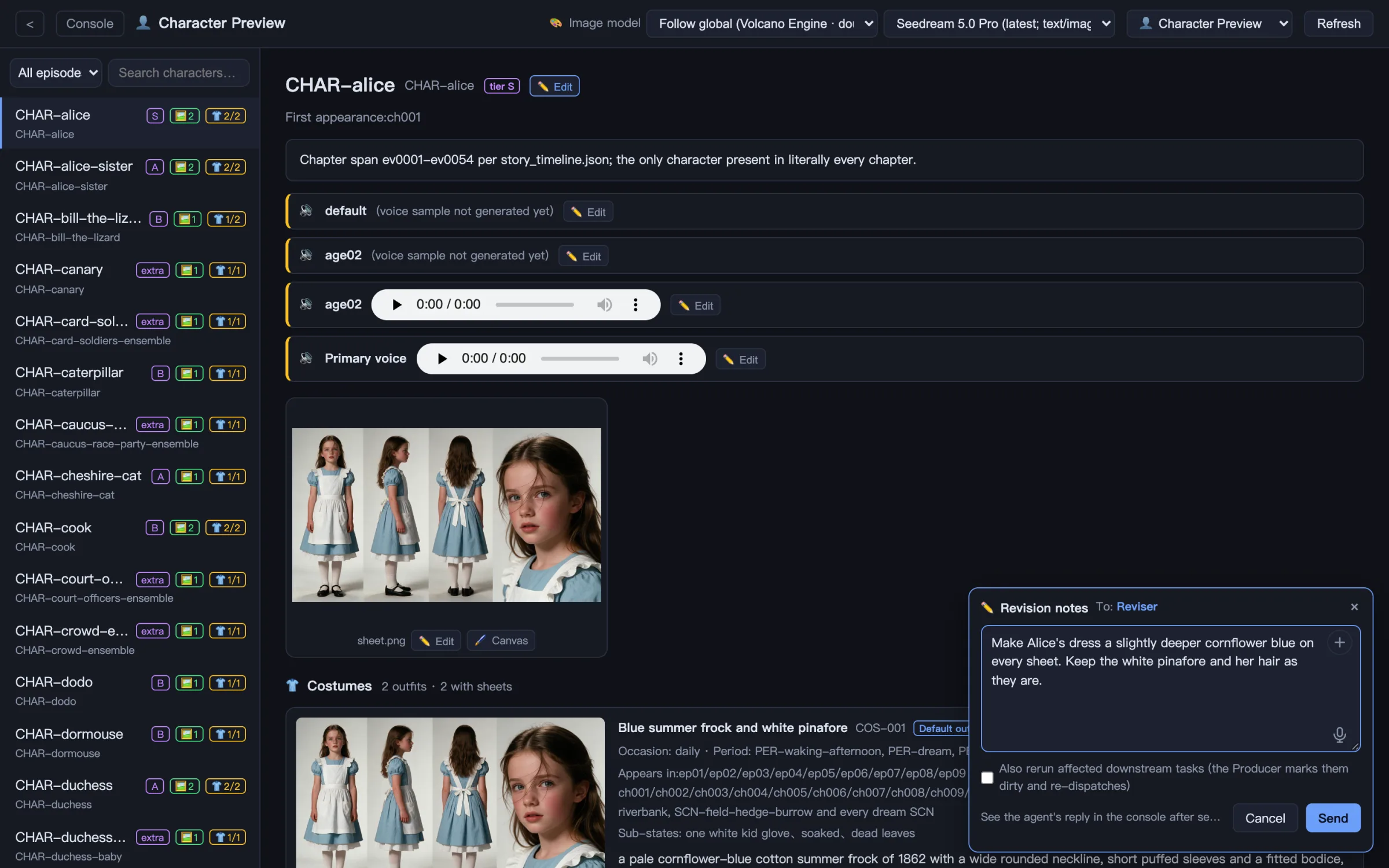
The window shows ✅ Sent to Reviser and closes. The Reviser's reply appears in the console, in its chat under 00-Orchestration → Reviser.
If a task about the same object is already running, the window warns you that the revision may conflict with it. You can still send.
WARNING
A revision can regenerate images, voices or video, which your providers bill. Regenerations are made at draft resolution.
What the Reviser does
The Reviser takes the place of the agents responsible for the object you pointed at. VideoAgents gives it those agents' role files, so it writes in their format and runs their checks.
| You point at | On | The Reviser works as |
|---|---|---|
| A character | Character Preview | Appearance Agent and Character Concept Agent |
| A voice | Character Preview | Voiceprint Agent and Voice Generation Agent |
| A costume | Character Preview | Costume Agent and Costume Concept Agent |
| A scene | Scene Preview | Scene Agent and Environment Concept Agent |
| A prop | Prop Preview | Prop Agent |
| A creature | Creature Preview | Creature Agent and Creature Concept Agent |
| A world bible section | Worldview Preview | World Agent |
| The whole script (title row) | Script Preview | Screenplay Agent and Dialogue Rewrite Agent |
| The storyboard | Storyboard | Storyboard Agent |
| A shot, a generation group, its media or a shot plate | Storyboard Preview | Shot Planning, Prompt, Video Generation, Image Generation or Shot Plates, as fits |
| Captions, narration, narration audio or music | Storyboard Preview | Caption, Narration, Narrator or Music Agent |
For anything else, the Reviser works out which agent owns the object and follows its role file.
It then:
- Edits the files or regenerates the media.
- Runs the owning agent's machine checks.
- Writes changes to the world bible directly, and adds them to
bible/changelog.md. - Ends its reply with a change log: the files it changed, the downstream tasks that need redoing, any sign-off that is now stale, and the checks it ran.
Rules it keeps
- When it regenerates a character, scene or prop, it uses the existing concept art and the project's art style as anchors. It does not invent a new look.
- It generates at draft resolution.
- It does not edit the workflow, dispatch other agents or switch engines.
- For a shot plate, it makes a new image from the current one with your note, swaps it in for that shot only, and keeps the original. Other shots that use the original are not affected.
What happens downstream
A change can make later work out of date. VideoAgents records each revision in runs/revisions/ and hands it to the Workflow Orchestrator, which marks the affected tasks as needing to be redone.
| Also rerun affected downstream tasks | What happens |
|---|---|
| Not ticked (default) | The affected tasks are only marked. Nothing is redone yet. The record reaches the Workflow Orchestrator with its next status check from auto-run, or with the next message that wakes it. |
| Ticked | The record goes to the Workflow Orchestrator as soon as the Reviser finishes, and it re-dispatches the affected tasks. |
If the change makes a sign-off stale, for example a storyboard you already signed at H3S, you get a desktop notification and the Workflow Orchestrator raises a new sign-off card. See Sign-off gates.
Collect notes and submit them together
On some pages you can jot down notes first and send them all at once:
- Storyboard: 🗒 Note buttons on the episode, each scene and each shot.
- Storyboard Preview: a 📝 Notes button on each generation group.
- Script Preview: a 🗒 Note button next to each ✏️ Edit button.
When you are ready, click 📨 Submit notes at the right end of the episode row. All of the episode's notes go to the Reviser as one revision, with the place each note refers to. The notes are cleared once they are sent. The Reviser works through them one by one and reports on each.
Buttons that go elsewhere
Not every edit button goes to the Reviser. The To: line in the window always shows the recipient.
- ✏️ Edit on the Workflow Preview page goes to the Workflow Orchestrator, which changes the plan.
- The ✏️ Edit buttons on individual blocks of the Script Preview go straight to the agent that owns that block.
- Sketch redraws on the Storyboard page, panorama anchors and the whitebox panels go to their own specialist agents.
- ✏️ Edit in the shot plate section of Scene Preview goes straight to the Shot Plates agent.
Good to know
- The Reviser has no memory between revisions. Each revision lists the last few revision records for the same object, so it can build on them.
- It runs alongside other work and takes an ordinary worker slot, so it doesn't wait for the pipeline.
- To change something the Reviser can't, such as the order of tasks, tell the Workflow Orchestrator in its chat.