Files, runs and versions
VideoAgents is not a black box. Every card, prompt, shot list, QA report and video is a file in your project folder, every task leaves a record of what it did, and every generated image or clip records the model, provider and references that produced it.
Everything is a file
Each agent's output is a file at a known place in the project folder. The path is part of the agent's job description, so the next agent knows where to find it. A few examples:
| What | Where |
|---|---|
| A character's appearance | bible/characters/<character id>/appearance.json |
| The prop cards | bible/props.json |
| Episode 1's screenplay | story/episodes/ep01/screenplay.md |
| Episode 1's shot list and generation groups | directing/ep01/shot_list.json |
| A group's video prompt | assets/prompts/ep01/grp005.json |
| A group's video | assets/clips/ep01/grp005.mp4 |
| Episode 1's subtitles and final video | edit/ep01/subtitles_final.srt, edit/ep01/final.mp4 |
| QA defects | qa/defects/DEF-ep01-visual-0042.json |
The preview pages read these files and show them in a friendly form, but you can always open the file itself. See Projects and the project folder for the full layout.
Where generated media comes from
Generated media keeps a record of how it was made:
- Images. Concept art folders hold a
prompts.jsonwith the prompt text for each sheet, the bible files it was based on, and any of your reference files it used, and how. - Videos. Each group clip has a
.meta.jsonnext to it with the model and provider, the request, the reference files, the checks it passed and the usage. - Usage.
usage_ledger.jsonlfiles list each generation call with its provider, model, size and the tokens or units it used. - Your references. Whenever an agent used something from
refs/, the output records it underuser_refs.
So you can always find out how a version of a character or a shot came about.
Runs: what each task leaves behind
Every task in the workflow gets its own folder, runs/<task id>/, with three files:
| File | Written by | What it holds |
|---|---|---|
result.json | The agent | The output files, its own checks, and any conflicts with the world bible it found |
eval.json | The Evaluation Agent | The score for each rubric item and the verdict (only when quality scoring is on) |
meta.json | The Workflow Orchestrator | The run id, attempt number, model, tokens used, start and finish times, input files and the versions of the files it produced |
A task isn't marked done until its record is complete. Other records in runs/:
runs/dag.json: the workflow itself, with every task's state.runs/<gate>/gate.json: the record of each gate, including your sign-off. See Sign-off gates.runs/revisions/: one record for each change the Reviser made.
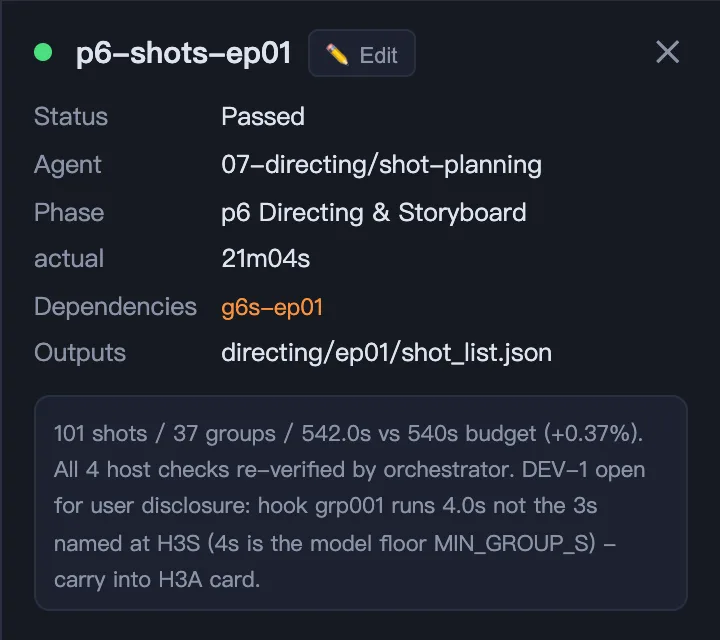
You rarely need to open these files yourself. The Workflow Preview page shows each task's state, agent, time, outputs and notes when you click it, and each agent's chat in the console shows its reply.
Defects
When a QA agent finds a problem, it files a defect ticket in qa/defects/, with its severity (blocker, major or minor), what rule it breaks, the evidence, who should fix it and its status. Open 🎛️ → Defects to see the project's defects and send them to the Workflow Orchestrator. See QA reviews and defects.
Versions
VideoAgents keeps earlier versions in several ways, from whole projects down to single images.
Whole projects
| Kind | How it works | Where to find it |
|---|---|---|
| Copies | 🎛️ → Version History → 📋 Copy Project makes a full copy as a new project. | Under its source in the Project dialog's Backups column |
| Auto backup | When 💾 Auto backup is on (Version History page), every sign-off zips the whole project. | The folder you chose; restore with › Import Project… |
| Snapshots | Before an agent starts, VideoAgents snapshots the project folder, at most every 30 minutes. It keeps the 3 newest plus the newest of each day for 7 days. | On a Mac in ~/Library/Application Support/VideoAgents-Snapshots, on Windows in %LOCALAPPDATA%\VideoAgents-Snapshots |
Snapshots cover the project folder only, not chats or settings. On a Mac they take almost no extra space at first. There is no button to restore one yet; it is done from the command line. See Command line.
VideoAgents also refuses commands from agents that would delete the data folder or a whole project folder. The check is strongest on the pi and agentics engines; on the other engines it is best effort.
Inside a project
- The world bible has controlled versions and a change log in
bible/changelog.md. Changes after a sign-off go through the change process instead of overwriting silently. - Post-production adjustments are versions on top of the master clips, which are never overwritten. You compare them A|B and can roll back. See Post-production.
- The Director's Console versions every change to the 3D whitebox and lets you compare versions A|B. See Director's Console.
- The Canvas keeps every version of an image you edit there, and you choose which one is final. See Canvas: edit an image.
- Reviser regenerations of a shot plate add a new image and keep the original.