Props
Weapons, letters, keys, bottles, phones: any object the story relies on gets a prop card and one reference image, so it keeps the same look and size from shot to shot. You review them on the 🗡 Prop Preview page.
How props are made
Props are made in two steps.
- Prop cards (Phase 4). The prop agent goes through the novel, finds every weapon, object and artifact, and marks the story props, the ones that move the plot or that characters keep using or pointing to. Every story prop gets a card in
bible/props.jsonwith an ID (PROP-…). No images are drawn at this point. - Prop images (per episode). At the start of each episode, after the shot list is final, the prop agent draws an image only for the story props that appear in that episode and have none yet. Images are reused in later episodes. Drawing per episode means a change of art style after the first episode does not waste images for the whole book.
Before each episode's storyboard is signed, the art director also checks that every story prop in it has a card and an image, and orders what is missing.
What a prop card holds
| Section on the page | Field | Meaning |
|---|---|---|
| Appearance description | visual | Shape, colour and details, written so it can go straight into a prompt |
| Material | material | What it is made of |
| Size definition | scale | Three parts, below |
| Story role | plot_role | Why the prop matters (shown as the note under the name) |
| Symbolism | symbolism | What it stands for, if anything |
| Holder/ownership chain | owners | Who has it, and when it changes hands |
| Source text | source | The chapter and quote it comes from |
| Inferred fields | inferred_fields | Which details were designed rather than taken from the novel |
Size
Size is carried by words, not by pictures. Every story prop has three size fields:
canonical_size: a measurement, such as "about 10 cm tall". It is for people and QA checks, not for prompts.relative_anchor: the size compared with a body part or an everyday object.prompt_token: one short phrase with a built-in comparison and how the prop is held, such as "a little glass bottle about a hand high with a paper label reading DRINK ME tied round its neck". This exact phrase goes into every video prompt that shows the prop.
Props with writing on one side
Props that are held and can be read on one side only (letters, contracts, photos, phones, maps) get a readable_face note describing the front and the back. Their image shows both sides, labelled, so each shot can say which side faces the camera.
The prop image
- One image per prop,
main_01.png. It is also the image attached to video generation. - The prop is the only subject, on a plain neutral background, with nothing else in the frame: anything extra in the picture tends to show up in the video.
- No people. No hands, bodies or silhouettes, and character images are never used as references for props. A person in the frame takes over the picture and can get the image rejected by a channel's content checks.
- Images in
refs/props/whose note names the prop are used as references. See Reference files.
Older projects may also have a scale_ref_01.png that shows the prop next to a size reference. These are no longer drawn or attached to new prompts, but existing ones are kept.
Review props on the Prop Preview page
Open the Preview design outputs menu (the picture icon in the console's top bar) and choose 🗡 Prop Preview.
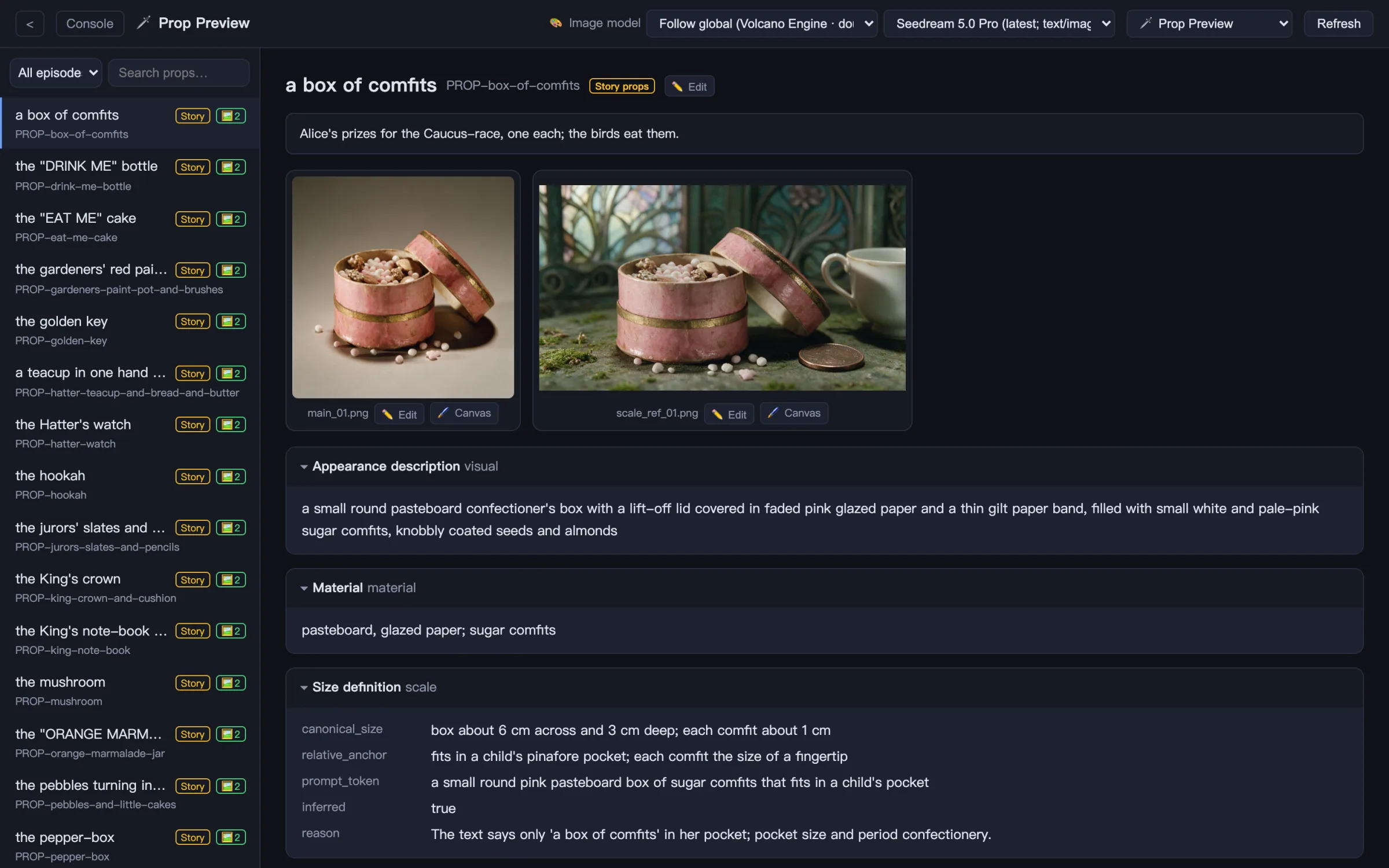
The list on the left shows every prop, with Story for story props and 🖼 with the number of images. Search props… matches IDs, names and types. The episode menu shows only the props in one episode.
The details on the right: name, ID, type, Story props, ✏️ Edit; First appearance and Appears in; the story role; the images (click one to see it full size); then the card's sections, with Inferred fields folded.
🎨 Image model at the top sets the channel and model used when prop images are drawn. Follow global uses the image setting on the 🎨 Generation Models page. See Image models.
The whole of props.json is also on 🌍 Worldview Preview → Props.
Ask for a change
- ✏️ Edit next to the name sends notes about the prop card to the Reviser, who works as the prop agent would. For example: "the key should be iron, not gold, and the size of a palm".
- ✏️ Edit under an image sends notes about that image.
- 🖌 Canvas under an image opens it in the Canvas.
See The Reviser and revision notes.
Files
| What | Where |
|---|---|
| Prop cards | bible/props.json |
| Prop images | assets/concepts/props/<id>/main_01.png |
| Earlier attempts | assets/concepts/props/<id>/candidates/ |