World bible
The world bible is the single source of truth for your story's world: its history, places, factions, customs, money, beliefs and special terms. The team writes it from your novel, you sign it off, and from then on every script, image and video follows it. You read it on the 🌍 Worldview Preview page.
Where it fits
The world bible is built in Phase 2 of the workflow, after the novel has been parsed and the story analysed:
- Nine worldbuilding agents work in parallel, each on one area (table below).
- The memory-bible agent merges their files into Bible v1, resolves conflicts and records every change in a changelog. Conflicts it cannot settle are passed to you.
- QA agents cross-check the nine files (the same fact told two ways becomes a defect) and check the timeline.
- You review the bible and sign the World bible sign-off (H1). See Sign-off gates.
After you sign, the bible is locked. Any later change goes through a change process: memory-bible assesses what it affects, writes the change into the changelog and tells the Workflow Orchestrator which finished work must be redone.
What is in the bible
The files live in the project's bible/ folder.
| Agent | File | What it holds |
|---|---|---|
| world | world.json | World overview: setting, countries and factions, world rules, tone |
| timeline | timeline.json | World history, calendar and major events |
| geography | geography.json | Terrain, rivers and mountains, cities and how places relate |
| religion | religion.json | Religions, gods and beliefs |
| culture | culture.json | Customs, language and etiquette |
| political | politics.json | Governments, camps and diplomacy |
| economy | economy.json | Currencies, trade and prices |
| magic-cultivation | cultivation.json | The power, magic or cultivation system: ranks, abilities, how they are ordered |
| dictionary | dictionary.json | One agreed meaning and spelling for every special term |
Later phases add more files to bible/: the art style (style.json), color script and aspect ratio spec, costumes (costumes.json) and props (props.json). Characters, creatures and scenes have their own subfolders. The change history is in bible/changelog.md.
How the team writes it
- Every setting cites its source. Each entry notes the chapter it comes from.
- Gaps are designed, not left open. When the novel says nothing about something the production needs, the agent designs a value that fits the rest of the world, marks it
inferred: trueand gives its reasoning. Placeholders such as "unknown" are not allowed and are sent back. - Terms follow the dictionary. All files use the dictionary's spelling for names and terms.
- One writer. Only memory-bible writes to
bible/. Other agents report conflicts instead of changing it, and a conflict the agent cannot settle is escalated to you.
A story without a magic system still gets a cultivation.json. In the sample project alices, a realistic adaptation of Alice's Adventures in Wonderland, it records how each impossible element of the book is staged for real.
Read the bible on the Worldview Preview page
Open the Preview design outputs menu (the picture icon in the console's top bar) and choose 🌍 Worldview Preview.
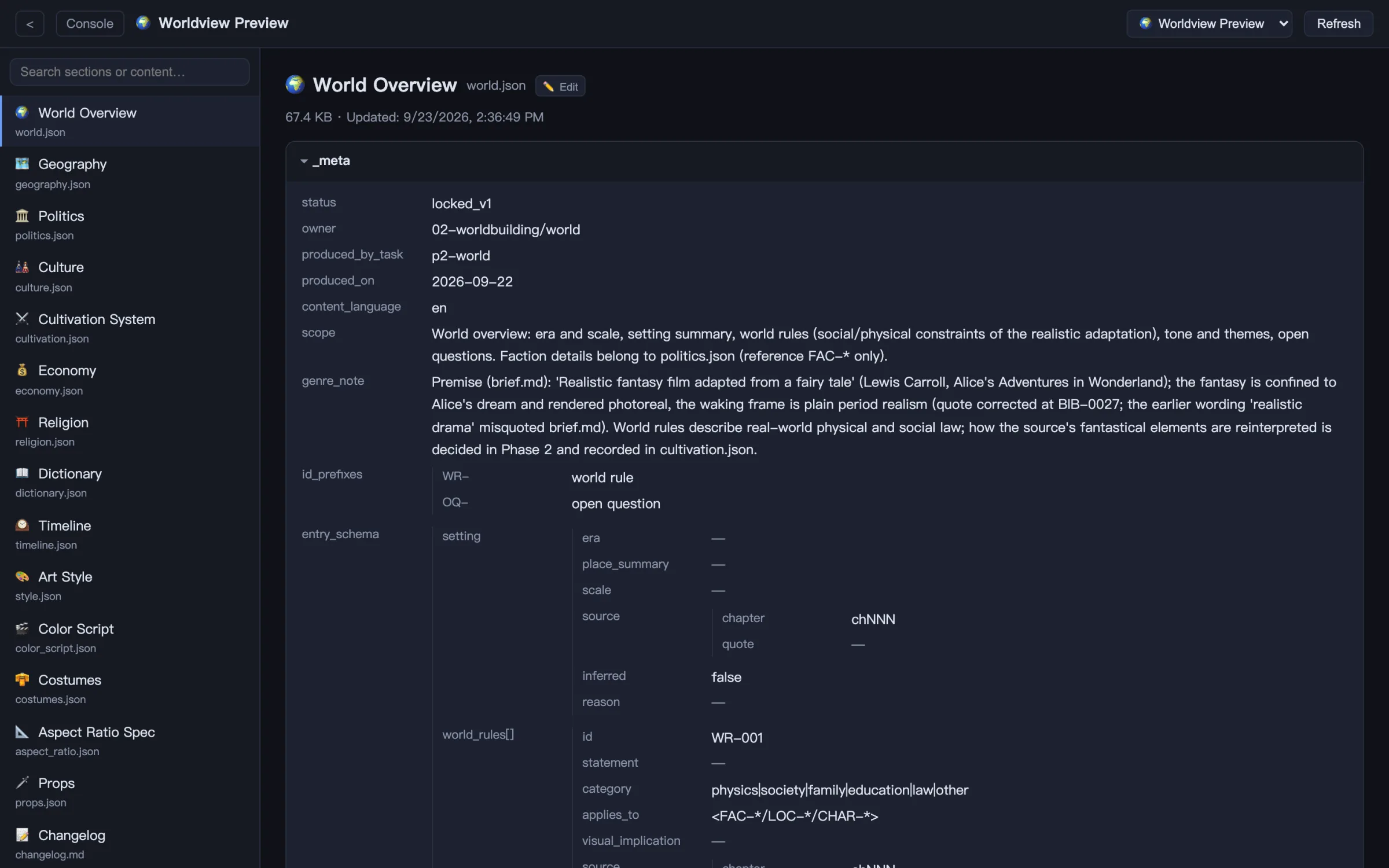
- Left: one entry per file at the top of
bible/, with its icon, name and file name: World Overview, Geography, Politics, Culture, Cultivation System, Economy, Religion, Dictionary, Timeline, Art Style, Color Script, Costumes, Aspect Ratio Spec, Props, Changelog. Other files at the top ofbible/appear at the end under their file names. - Search sections or content… filters the list by name and by anything written inside a file.
- Right: the selected file, with its size and last update time. Simple top-level values are grouped under Basic info; every list or group gets its own section. Click a section heading to fold it.
- Markdown files, such as the changelog, are shown as plain text.
Characters, creatures and scenes are not on this page; they have their own preview pages.
Ask for a change
- Select the file and click ✏️ Edit next to its name.
- A Revision notes box opens in the corner, addressed to the Reviser and already holding the file's path.
- Write what should change and press Enter or click Send.
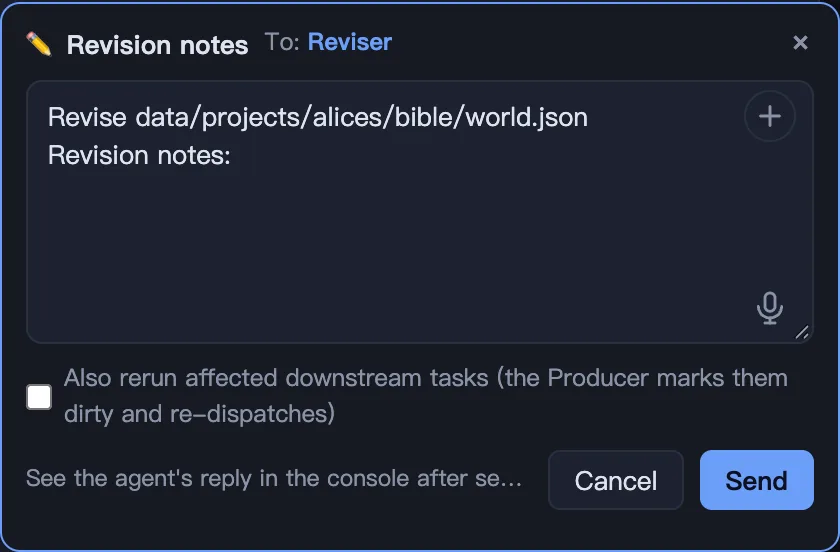
By default the Reviser changes only what you pointed at and records the change. Tick Also rerun affected downstream tasks if finished work that depends on it should be redone right away; otherwise the Workflow Orchestrator decides later from the change record. See The Reviser and revision notes.
You can also talk to the Workflow Orchestrator in the console chat, for example to give a ruling on a conflict it reported.
Common questions
Can I edit the JSON files myself? They are plain files in bible/, so you can. Changes made outside the team skip the checks and the changelog, so prefer ✏️ Edit. If you do edit a file, tell the Workflow Orchestrator what you changed.
The novel and my wishes disagree. Which wins? The bible follows the source text first. To depart from it, say so in the project's creative brief (🎛️ → Creative Brief) or tell the Workflow Orchestrator; the change is then recorded as a ruling in the changelog. See Creative brief.