Background extras (NPCs)
A street at rush hour with nobody in it looks wrong. NPC staging adds nameless background figures and foreground objects (passers-by, someone on a bench, a blurred lamp post in front of the lens) so a scene has a foreground, a midground and a background. Each scene is judged automatically when the screenplay is broken down, and you can switch any scene on or off and set how busy it is.
TIP
Available from v1.0.39.
The project switch
Set it in 🎛️ → Output Settings → NPC staging (also in the new-project wizard):
| Value | What it does |
|---|---|
| Per scene (default) | Each scene is judged during the script breakdown. You can change any scene by hand. |
| All off | No scene gets NPCs. The per-scene chips show Master off. |
Extras the screenplay names (a patrolling guard, a passenger who speaks, onlookers who react) are not NPCs. They are handled as named extras and are not affected by this switch.
How a scene is judged
When the Story Timeline agent builds the script breakdown, it decides for every scene whether NPCs belong there and how many, and writes a short reason that quotes the screenplay.
- On for public or busy places where people would plausibly be at that time: streets, markets, squares, docks, stations, taverns and tea houses, banquets, courts, barracks, classrooms. Busy if the screenplay mentions a crowd or bustle; moderate for an ordinary public place; sparse for semi-public places such as courtyards, corridors, shops or a village lane.
- Off where the screenplay says the place is empty or cleared; for scenes that need "just them" (a secret talk, sneaking in, a stand-off); for private spaces (bedrooms, secret rooms, carriages), dreams and inner spaces; late at night (except night markets, lantern festivals and banquets); and for scenes already full of named extras.
- A character being alone does not mean the place is empty.
| Density | Looks like |
|---|---|
| Sparse | One or two figures, far from the main subject |
| Moderate | Three to five, not a crowd |
| Busy | People filling the depth of the frame, with space kept clear in front of the subject and along their eye line |
Change a scene
Every scene header on the 📜 Script Preview and 📋 Storyboard pages has a 🚶 NPC chip. It shows the scene's current value (for example On·Moderate or Off) and where it comes from: Auto, manual or Not judged.
- Click the chip.
- Choose Auto (follow the automatic judgment), On or Off.
- Pick a Density, or leave Follow auto judgment.
- Click Save.
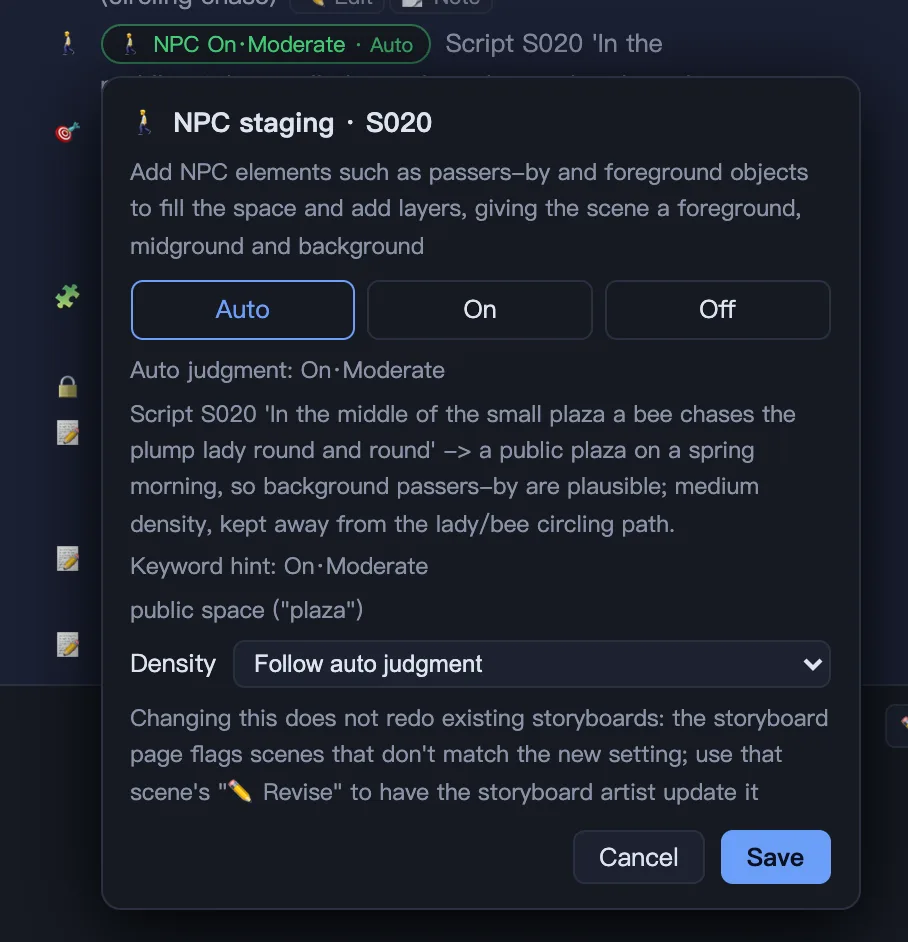
The popup also shows the automatic judgment with its reason and a keyword hint based on the scene's wording. Your choice is saved in story/episodes/<ep>/scene_npc.json. Re-analyzing the screenplay does not overwrite it, and agents don't change it.
Which value counts:
- All off in Output Settings turns every scene off.
- Otherwise your On or Off for the scene.
- Otherwise the automatic judgment.
- A scene that was never judged (for example in a project broken down before NPC staging existed) counts as off.
For density, your choice comes first, then the automatic judgment, then the keyword hint, then Moderate.
After you change a scene
Changing the switch does not redo anything that already exists. On the 📋 Storyboard page, a scene whose storyboard doesn't match the new value is flagged ⚠ Storyboard not updated for this setting. Click that scene's ✏️ Edit and ask for the NPCs to be added or removed. Only the scene's NPC lines change; the shots are not re-cut. The later steps then catch up as their checks require. If the whitebox was already signed off, changing it means signing off again.
What NPCs change downstream
Only scenes where NPCs are on are affected:
| Step | What happens |
|---|---|
| Storyboard | Each shot lists its NPC layers (foreground, midground, background) as 🚶 lines. They are placed by shot size: wide shots get midground and background figures; medium shots background passers-by and maybe a blurred foreground object; close-ups only a blurred foreground object or blurred background figures; inserts none. |
| Sketches | NPCs are drawn as loose, nameless figures. |
| Shot list and composition | The final shots keep the same NPCs, and the composition names them in the matching layer, smaller and softer than the subject and never in its way. They are not counted as cast. |
| Whitebox | NPCs become neutral-coloured extras (EXTRA-NPC-01 …), labelled in the legend as an anonymous passer-by, not a named character. |
| Video prompt | A fixed Background figures (NPC) section describes them shot by shot, and the rule that every person must match a reference is narrowed to the named characters. |
| Ambience | A bed of crowd murmur that matches the density, with no clear words. |
Background plates stay empty of people, and foreground objects are not put into them either, because one plate is shared by several shots.
Good to know
- Video models can paste a main character's face onto a passer-by. Small, blurred figures seen from behind work best, and the prompt says they look like no one in the reference images.
- Without the whitebox, NPCs can jump between two groups of the same scene, because only the prompt text keeps them consistent. With the whitebox on, their positions are keyframed.
- NPC movement doesn't count toward a shot's timing and doesn't take a beat from the main action.