World models
A world model turns one of a scene's 360° panoramas into a 3D world you can walk through. It is lined up with the scene's 3D set, so you can explore the place, save views from anywhere as background plates, and use it as the backdrop in the Director's Console.
A world model is a Gaussian-splat scene, made either by World Labs Marble in the cloud or by HunyuanWorld on a GPU machine of your own.
Before you start
Whitebox is on (🎛️ → Output Settings → Whitebox) and the scene has a 3D set. Otherwise the 🌍 World model panel does not appear.
The scene has at least one panorama. A world model is always built from a panorama. See 360° panoramas.
A world model provider is set up in ⚙️ → Generation Models → 🌍 World model. The Active provider menu in the card's title bar decides which one runs:
Provider What you enter Notes World Labs (Marble) Your World Labs API Key (created at platform.worldlabs.ai) and a model: Marble 1.1 (default), Marble 1.1 Plus (larger worlds for outdoor and large spaces, more credits), Marble 1.0, Marble 1.0 Draft Verify Key checks the key and shows your remaining credits HunyuanWorld Worker address and token of a worker you run on a GPU machine. Under Advanced: views (default 32), training steps (default 8000), FP8 quantization (off) Verify shows the GPU, whether it is busy and the free disk. Setup guide: VideoAgents-hunyuan-rpc. Available from v1.0.40. The other cards on that page are covered in Engines & Models.
WARNING
Each Marble world model uses World Labs credits from your account. HunyuanWorld uses no credits, but keeps your GPU busy for 20–40 minutes per world.
Generate a world model
- Open 🏔 Scene Preview, pick the scene and find 🌍 World model, below 🌐 Panoramas.
- In Panorama source, pick the panorama to build from, for example Panorama A1. If an anchor has panoramas in several lighting schemes, the scheme is added to the name.
- Click ➕ Generate world model. A log shows progress. Marble takes about 5–10 minutes, HunyuanWorld about 20–40 minutes.
- When it is done, a card for the new world model appears.
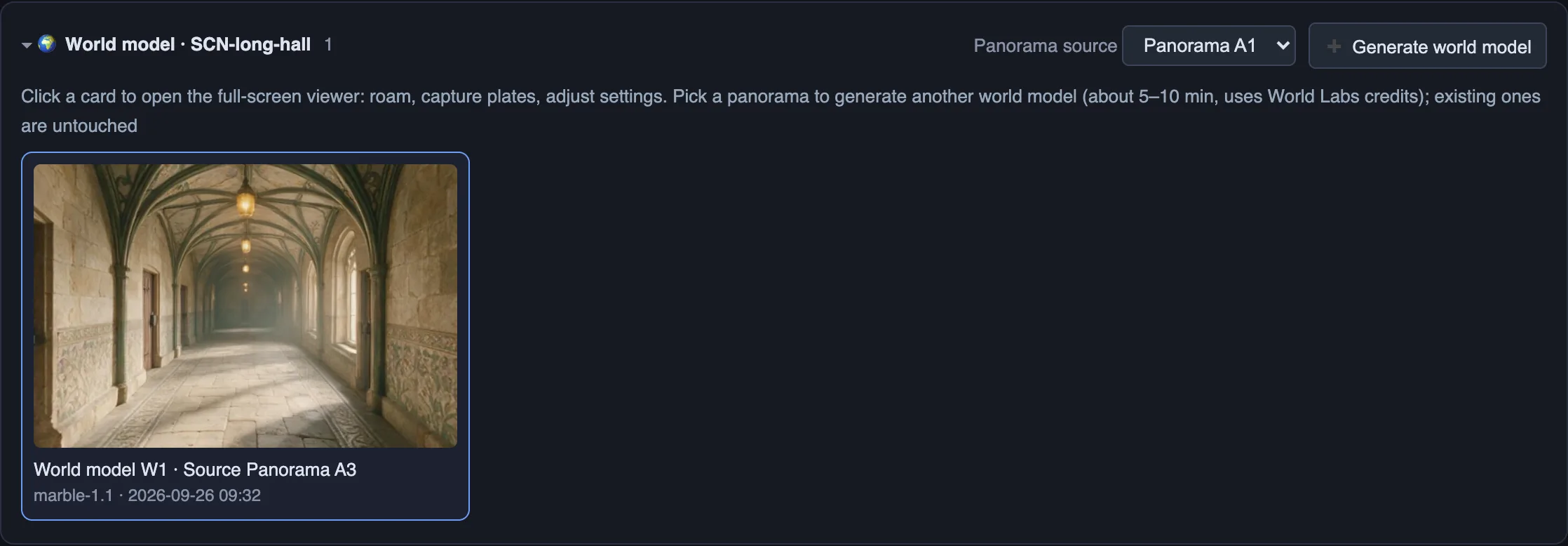
Every click adds a new world model, numbered W1, W2 and so on. Existing ones are kept. Each card shows a front view, the panorama it was built from, the model and the date. With more than one, the default world model carries a ★ Default badge.
If the scene has no panorama yet, the button is greyed out. Click ➕ Go create a panorama to jump to the Panoramas panel with the create form open.
Explore a world model
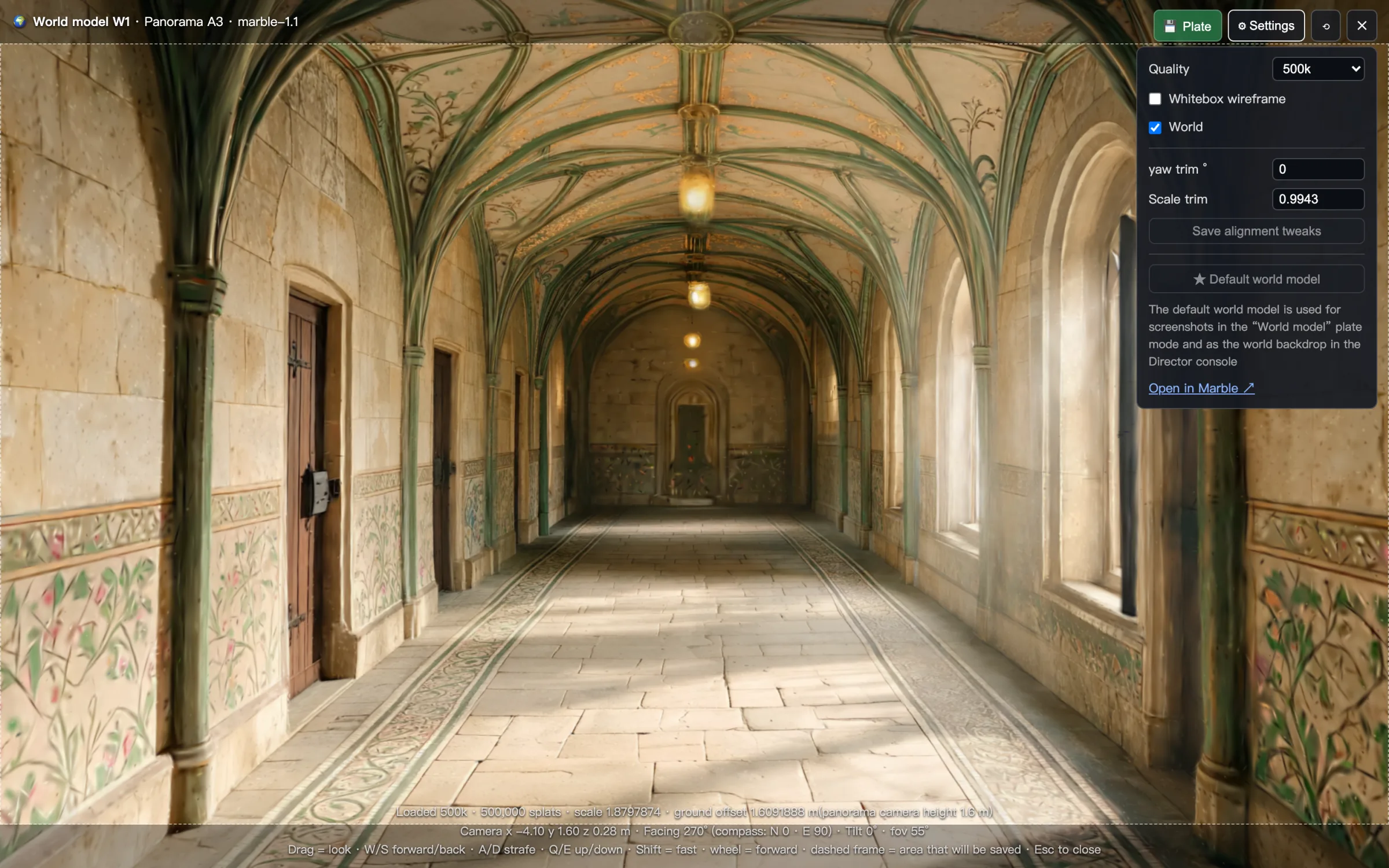
Click a card to open the full-screen viewer.
| Action | Control |
|---|---|
| Look around | Drag |
| Forward / back | W / S, or the scroll wheel to move forward |
| Left / right | A / D |
| Up / down | Q / E |
| Faster | Hold Shift |
| Back to where the panorama was taken | ⟲ |
| Close | Esc or ✕ |
The keys do nothing while you are typing in a settings field. The line at the bottom shows the camera position in metres, its compass facing (north 0°, east 90°), tilt and field of view.
⚙ Settings opens these options:
| Setting | What it does |
|---|---|
| Quality | How many splats to load: 500k (default), full_res, 150k or 100k, depending on what the world has. Lower loads faster. |
| Whitebox wireframe | Draws the 3D set as lines over the world, to check the alignment |
| World | Shows or hides the world itself |
| yaw trim °, Scale trim | Fine-tune how the world lines up with the 3D set. Save alignment tweaks keeps them for this world model. |
| Set as default world model | Makes this the default (the button reads Default world model when it already is) |
| Open in Marble ↗ | Opens the world on the World Labs site (Marble worlds only) |
Capture background plates
Walk to a viewpoint, turn until the dashed 16:9 frame holds the picture you want, and click 💾 Plate. The view is saved as a new background plate for the scene, with its camera position. It appears in 🎦 Shot background plates as "hand-captured (world model)" and in the Swap list in Storyboard Preview. See Background plates.
The default world model
One world model per scene is the default: the first one, unless you choose another in ⚙ Settings. The default is the one used:
- in the Director's Console: World-model view replaces the grey set with the world and keeps the characters, props, paths and cameras. See-through objects (on by default) draws them in front of walls so you can follow their movement;
- by the older World model background plate mode, which some existing projects still use.
Files
| Path | What it is |
|---|---|
assets/concepts/scenes/<SCN-ID>/world/worlds/W<n>/ | One world model: world.json, splat files splats_<quality>.spz, collider.glb, thumbnail.jpg, world_pano.jpg, the source pano.png and input.json |
assets/concepts/scenes/<SCN-ID>/world/index.json | Which world model is the default |
A world made before multiple world models were supported sits directly in world/ and is shown as W1.
Good to know
- It follows the 3D set loosely. The world is rebuilt from a picture, so walls can sit a little off from the set. Turn on Whitebox wireframe and use the trims to line it up.
- It is best near the panorama. The further you move from where the panorama was taken, the more the world breaks down. A large scene may need several world models built from panoramas in different places.
- Marble limits. World Labs allows about 3 world requests a minute and 60 an hour.
- HunyuanWorld limits. A worker runs one job at a time; if it is busy, try again later. The first run downloads about 60 GB of model weights. Sharpness is limited by the training views (1600 × 900 by default), so start from a sharp panorama.
- HunyuanWorld licence. The HunyuanWorld-1.0 community licence does not cover the EU, the UK or South Korea, and products with more than 1 million monthly users need a licence from Tencent. Details are in the worker repository's README.
Troubleshooting
There is no 🌍 World model panel. Whitebox is off for the project, or the scene has no 3D set.
➕ Generate world model is greyed out. The scene has no panorama yet, or a world model is being generated right now.
The viewer fails to load the world. Open ⚙ Settings and choose a lower Quality.