QA reviews and defects
Before an episode is released, up to eight QA agents review it, each from one angle: story logic, characters, timeline, world, picture, sound, content safety and copyright. Problems they find become defect tickets, which you can read and hand off on the 🧾 Defects page.
How quality is checked
Work passes three layers of checks:
- Automatic checks on every result: file format, lengths, required fields, reference counts and many more.
- The quality judge scores each task against a rubric. Work below the pass line goes back with comments.
- The QA reviews check the finished episode, each on its own dimension.
How strict layers 2 and 3 are is set per project in 🎛️ → Review Settings. See Review settings.
The eight reviews
| Review | Agent | What it checks | Passes when |
|---|---|---|---|
| Logic | Logic QA Agent | Story logic, and departures from key events in the novel | No blocker defects |
| Characters | Character Consistency QA | Faces, costumes and voices across the episode | Consistency score of 85 or more, and every main character is recognisable |
| Timeline | Timeline QA | Time, season and age stay consistent | No conflicts |
| World | World Consistency QA | The picture matches the world bible: buildings, clothing, systems | No blockers |
| Picture | Visual QA | Distortion, flicker, artefacts, resolution | At most 2% of shots flawed, none of them key shots |
| Sound | Audio QA | Loudness, clipping, lip offset | All measures within limits |
| Content safety | Content Safety Agent | Platform red lines such as violence and gore, and a clear age rating | No banned content |
| Copyright | Copyright Agent | Licences for footage, music and fonts | Every item has a recorded source |
Reports are saved in qa/reports/<ep>/, one JSON file per review. Other project types use their own final reviews as well, for example an audio-sync review for audio-to-video projects and a final review for mashups.
How strict the reviews are
Each review has a strength from 0 to 100 in Review Settings (Logic review, Character consistency review, Timeline review, Worldbuilding review, Visual quality review, Audio quality review, Content safety, Copyright review):
| Strength | Effect |
|---|---|
| 0 | The review is skipped |
| 1–39 (lenient) | Only blockers stop the work; score thresholds are 10 points lower |
| 40–69 (normal) | The thresholds above apply as written |
| 70–89 (strict) | Thresholds are 5 points higher; blocker and major defects stop the work, and minor ones are ticketed too |
| 90–100 (strictest) | Thresholds are 10 points higher, with zero tolerance for any defect |
All review strengths are 0 by default, so the reviews run only for the dimensions you raise. The Quality judge setting in the same dialog is the pass score for task scoring (60 by default); 0 skips scoring.
Reviews run at the quality gates, not on every draft: while work is being drafted and reworked, no QA reviews are sent. Before each gate, the Workflow Orchestrator sends the reviews whose strength is above 0.
Defect tickets
Every problem found becomes a ticket in qa/defects/, named like DEF-ep01-visual-0042.json. A ticket records:
- Severity: blocker, major or minor.
- What was violated and the evidence (for example a frame grab).
- The target artifact, the agent that reported it and the agent assigned to fix it.
- Status: open, fixing, verify, closed or waived. A ticket is closed only with a resolution, verified by someone other than the fixer. A waived ticket must link to the gate decision that accepted it.
When a cause lies upstream (for example a wrong setting in the world bible), the ticket goes to the agent that owns it, and only the affected work downstream is redone.
Defects and gates
A quality gate cannot pass while blocker or major tickets are open. It either holds, or passes with a waiver that lists each accepted ticket, the reason and who signed it. When all eight reports are clean, you sign the release (H5). See Sign-off gates.
Rework
How many times agents redo failed work on their own is the Retry count in ⚙️ → Advanced → Agent Advanced Settings (or the /retry command). It is 0 by default: the first failure comes to you instead of being redone. See Agent advanced settings.
The Defects page
Open it from 🎛️ → Defects.
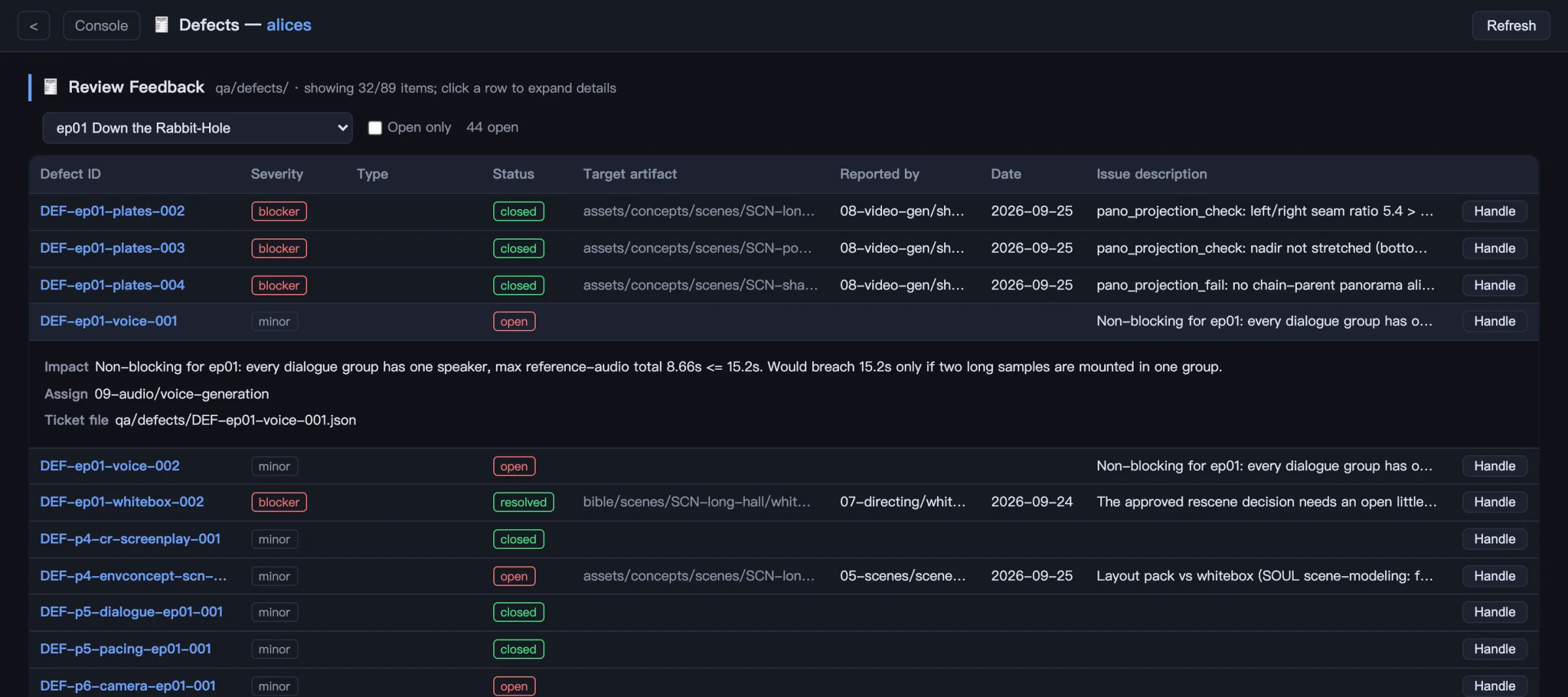
- Choose an episode in the drop-down, All episodes, or General tickets without an episode number. Tick Open only to hide closed tickets. The count next to it shows how many are still open.
- The table shows each ticket's Defect ID, Severity, Type, Status, Target artifact, Reported by, Date and Issue description.
- Click a row to expand it: Violated convention, Evidence, Impact, Suggested fix, Assign, Resolution, Waiver and Ticket file.
- Click Handle to open a message box addressed to the Workflow Orchestrator, filled in with the ticket's details. Add any instructions and send. The Workflow Orchestrator sends the ticket to the agent responsible and updates its status when the fix is done.
Defects also show up elsewhere: on the 🎚️ Post-production page, groups with open tickets get a red dot in the list and on the episode timeline, and the Has defects filter shows only those groups.