Fusion fiction
Fusion fiction merges two books into one new screenplay. Book A, your project, keeps its story and the inner life of its characters. Book B supplies the world (geography, politics, economy, religion, culture and so on) and what the characters look like. For example: a gang story from Book A set in the world of Journey to the West, with its hero recast as the Monkey King and rival gangs turned into demon clans.
If Book B is a well-known classic or public-domain work, you don't need its text; the agents work from what the model knows about it ("classic mode"). Otherwise you supply the full text.
It comes with VideoAgents as a plugin that is off until you enable it.
WARNING
Fusion fiction writes its results directly into the project's bible/ and story/ folders, replacing the world bible, character cards and screenplays. It keeps no versions and cannot roll back. Copy the project first with 🎛️ → Version History (see Copy and delete projects).
Before you start
The project (Book A) must have finished the film workflow's story, world bible, characters and screenplay stages:
- the world bible in
bible/, includingbible/characters/relationship.json, signed off; story/episode_plan.jsonand the episodes' screenplays.
If a stage is missing, finish it in the film workflow first.
Enable the plugin
Open ⚙️ → Plugins.
Find fusion-fiction and click Enable.
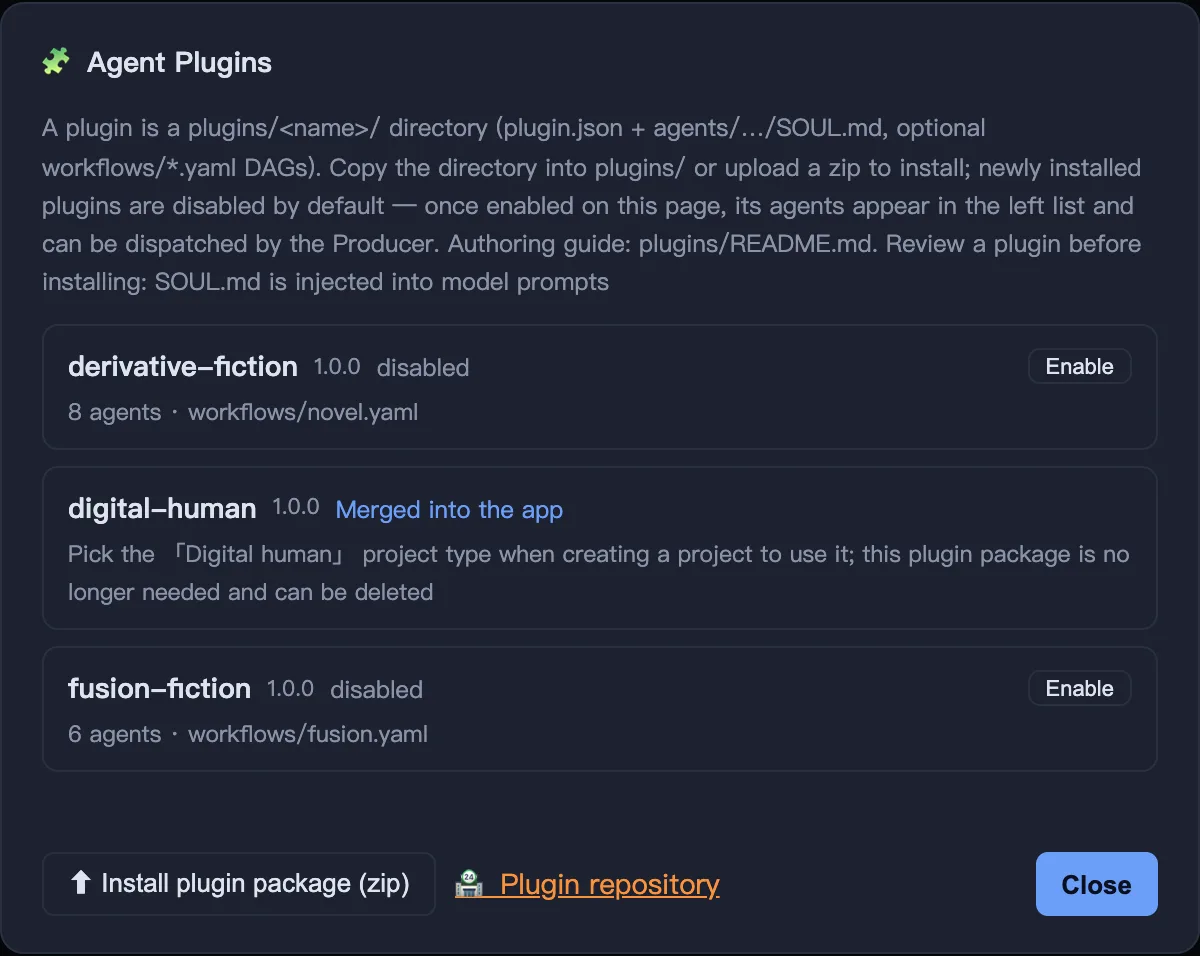
Close the dialog. Six agents appear in the left panel: Fusion Planner, Classic Scholar, Character Mapper, World Merger, Script Transposer and Fusion Fidelity QA.
Start a fusion
Open the project, pick the Workflow Orchestrator and say which book supplies what, plus any character pairs you have already decided. For example:
Start the fusion-fiction workflow. Book A is this project and supplies the
story and the characters' souls. Book B is "Journey to the West" (classic mode)
and covers character appearances, geography, politics, economy and religion.
Character pairs I'm locking in now:
<your hero> = Sun Wukong
<your mentor figure> = Tang Sanzang
Recommend pairs for the others and let me confirm.
For full-text mode, the Book B text goes into the project's fusion/source_b/novel/ folder.
The three plans you agree on
| Plan | File | What it holds |
|---|---|---|
| Dimension matrix | fusion/fusion_plan.json | For each dimension (story, soul, appearance, each world dimension, art style, period anchor): taken from A, from B, or blended |
| Character map | fusion/character_map.json | Your locked pairs, plus recommended pairs with confidence, reasons and three alternatives each, and what to do with characters left unmapped |
| Concept dictionary | fusion/dictionary.json | Book A's objects, institutions and slang with their Book B equivalents, plus a list of modern words that must not appear |
Workflow and sign-offs
| Stage | What happens | Your sign-off |
|---|---|---|
| fs0 Fusion plan | You and the Fusion Planner settle the dimension matrix, the period, classic or full-text mode, the first character pairs and the red lines | FH1 fusion blueprint, including that the canon will be edited directly |
| fs1 Book B intake | Classic mode: the Classic Scholar builds Book B's world and character files from model knowledge, noting which version it follows. Full-text mode: the built-in parsing agents read the text | — |
| fs2 Character map | The Character Mapper recommends pairs from archetype, relationships, personality and faction, and marks honestly what has no match | FH2 character map: lock, swap, add or remove pairs |
| fs3 World fusion | The World Merger writes the fused world and the merged character cards (A's soul in B's shell) into bible/, and builds the dictionary | FH3 fused world bible and dictionary |
| fs4 Screenplay transposition | Episode by episode, the Script Transposer keeps the beats and changes the shell: every name follows the map, every swapped concept follows the dictionary. Dialogue is then polished. The first episode goes first as a pilot | FH4 first episode read |
| fs5 Full review | Logic, world consistency, character consistency, fidelity to both books, copyright | FH5 final screenplays |
| fs6 Optional | Re-run downstream stages (scenes, art, storyboard) so the preview pages show the fused world; or hand over to Derivative fiction to turn it into a novel | — |
Because the results land in the canon, the existing pages show them straight away: 🌍 Worldview Preview and 👤 Character Preview after FH3, the screenplays in 📜 Script Preview after fs4. You decide how much of fs6 to re-run; the Workflow Orchestrator does not extend it to costly video generation on its own.
Good to know
- The original screenplays are kept as snapshots. Before an episode is rewritten, its original screenplay is saved to
fusion/episodes/<episode>/source_screenplay.md. The fidelity review compares against it, and so can you. - What the fidelity review looks for: lost soul (Book A's character or story no longer comes through), broken shell (something from Book A's world leaks into Book B's), map violations and dictionary drift.
- Copyright is always reviewed. Book A is often a copyrighted work, so the fused result goes through the copyright review.
- Process files (Book B's files, the plans, the transposition log, conflicts) are kept in
fusion/. - Novelization at fs6 needs the derivative-fiction plugin enabled as well.