Dialogue, voices and narration
By default the video model speaks each line in the character's voice while it generates the picture, so lips and speech match. This page covers that default, the post-production dubbing alternative, the speech library used for previews, per-line direction, off-screen and voice-over lines, and the narrator.
Before you start
- Characters who speak have a voice: a voice card and a short voice sample. See Voices.
- A text-to-speech (TTS) provider is set on ⚙️ → Generation Models if you want the speech library, dubbing or narration. See Voice models.
The settings
All dialogue switches are in 🎛️ → Output Settings. See Output settings for every field.
| Setting | Choices | What it does |
|---|---|---|
| Dialogue voice | Native video audio (default), Post-production dubbing | Who produces the spoken dialogue in the finished clips |
| Generate dialogue speech | On or off | Keeps a line-by-line TTS library of the episode's dialogue for previews. Required for dubbing |
| Sound-picture split | Off (default), Script markers only, Auto | Lets lines be heard while the speaker is off screen (O.S.) or as a voice-over (V.O.) |
| Narration | On or off (off by default) | Adds a narrator track read from the episode's narration script |
Native video audio
With Native video audio, dialogue is part of the group video:
- The prompt writes each line inside
{ }braces in the shot where it is spoken. - Each speaking character's voice sample (3–5 seconds of calm, neutral speech) is attached as reference audio, so the model keeps the voice steady across groups and episodes. The sample only sets the voice; the model generates the actual speech and mouth movement.
- A group can have at most three speakers on screen.
TTS is never laid over on-screen dialogue in this mode, because speech that does not come from the picture does not match the lips. If a line comes out wrong, the group is regenerated. The Lip Sync Agent only corrects a clip whose whole soundtrack is offset from the picture.
Post-production dubbing
With Post-production dubbing, the groups are generated exactly as above. Afterwards, each line is synthesized with the character's voice and fitted into the time the character's mouth moves in the clip. The dialogue track is replaced; the picture and length do not change. The model's own speech is removed underneath, leaving effects and ambience.
Dubbing needs Generate dialogue speech, so that switch is locked on in this mode. The dubbed files are kept in assets/audio/voice/<ep>/dub/<group>/, and later steps (upscale, edit, mix) use the dubbed clips.
The dialogue speech library
With Generate dialogue speech on, VideoAgents keeps one synthesized audio file per line of dialogue in assets/audio/voice/<ep>/tts/. It is used by the animatic, the whitebox reel and dubbing. When a line or a voice changes, the library is updated the next time it is needed.
On 🎦 Storyboard Preview, the 🗣 Dialogue speech panel shows the library's state: total lines, how many are fresh, stale, missing or uncast, and the TTS provider and model.
- 🗣 Refresh dialogue speech synthesizes only the lines that are missing or changed.
- ↻ Re-synthesize all ignores the cache and synthesizes every line again. Each line is billed.
- Lines whose speaker has no voice assigned are skipped with a warning; add the casting or fix the speaker, then refresh.
Direct each line
Expand the 🗣 Dialogue speech panel to see Line direction. The Dialogue Direction Agent writes a direction for every line when the episode's dialogue is final; you can change it here.
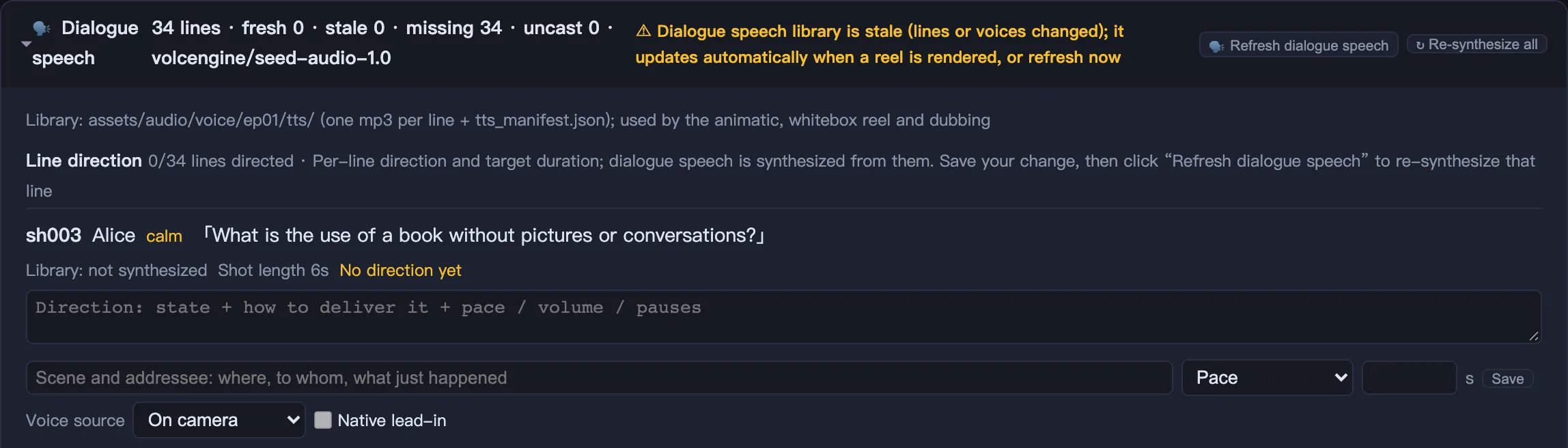
For each line you can set:
- Direction: state, how to deliver it, pace, volume and pauses.
- Scene and addressee: where, to whom, what just happened.
- Pace (fast, medium, slow). Choosing one fills in a target duration in seconds based on the line's length, capped at the time available in the shot. You can also type a duration yourself.
Click Save, then 🗣 Refresh dialogue speech to synthesize the line again. With a TTS provider that cannot follow timing, the direction is used only as a tone instruction and the scene and duration are ignored; the panel says so.
Off-screen and voice-over lines
With Sound-picture split on, a line can be heard without the speaker speaking on screen:
- Off-screen O.S.: the speaker is in the scene but out of frame (on the phone, behind a door, walking out, a reaction shot of the listener).
- V.O.: a voice from outside the moment (inner thoughts, a letter read aloud, a remembered voice).
Script markers only accepts only lines the script marks (O.S.) or (V.O.). Auto also lets the storyboard move a line off screen in a few listed situations (for example a long line over the listener's reaction, or a line spoken while leaving the frame), each with a recorded reason.
Off-screen lines are not put in the group video prompt. They are synthesized in post with the character's voice and mixed in as their own track. In the line direction list, set Voice source to On camera, Off-screen O.S. or V.O.; for off-screen lines you also choose a Source effect (Original, Phone, Behind door, Distant, Inner, Memory) and an Offset (s) from the start of the shot where it is heard (0.4 seconds by default). The files are saved in assets/audio/voice/<ep>/offscreen/, and subtitles mark these lines (O.S.) or (V.O.).
Native lead-in
Native lead-in lets a speaker start a line off screen in the previous shot of the same group and finish it on camera after the cut (a J-cut made by the model itself). It is available only when Sound-picture split is Auto, Dialogue voice is Native video audio and the group uses Seedance 2.5. The lead-in is at most 1 second. Lines with a lead-in show a 🎧 Lead-in tag on the storyboard.
Narration
With Narration on, the episode gets a narration script (story/episodes/<ep>/narration.md) and the Narrator Agent reads it with the project's narrator voice. Narration is a separate post-production track: it starts at the shot it is attached to and runs over the following shots.
- Each narration line appears on 🎦 Storyboard Preview as a 🎙 line at its starting shot, with an estimated length, whether its position is final, and a player once recorded.
- The narrator's measured durations are checked against the room in the picture before the episode's videos are generated, so narration that does not fit is caught early.
- Turning narration off means the film has no narrator at all. Characters' own off-screen lines are controlled by Sound-picture split, not by this switch.
Good to know
- How long a line takes is estimated from its length. English lines are counted in words, at the speed on the character's voice card or 160 words per minute by default.
- Give feedback on a line, a narration line or its recording with ✏️ Edit next to it; the request goes to the Reviser.
- Characters who appear at different ages can have one voice sample per age, and each group uses the sample that matches its point in the story.