Creatures
Animals, monsters, dragons, mounts and made beings are treated like characters: each one has a registry entry, a description detailed enough to draw from, and a reference sheet that keeps it looking the same in every shot. You review them on the 🐎 Creature Preview page.
How creatures are made
| Step | Agent | Result |
|---|---|---|
| Register and describe | creature | Every creature in the novel gets an ID (CRE-…) in bible/creatures/index.json and a card in bible/creatures/creature.json: body size against a familiar reference, surface (scales, feathers, fur and colours), head, eyes and distinguishing marks; habits and habitat; abilities and strength; and its forms, such as young, adult or transformed, with the chapter where each begins |
| Mounts | mount | For creatures that are ridden or driven: owner, how and when it was acquired, saddle and other tack, speed, how many riders, how it moves and how it is ridden. Saved in bible/creatures/mount.json |
| Reference sheet | creature-concept | A sheet per creature, drawn when an episode needs it (below) |
The cards are written in Phase 3 of the workflow and are part of the Characters & assets sign-off (H1A). As everywhere in the bible, each entry cites its chapter, and details the novel leaves open are designed and marked inferred: true.
Reference sheets, drawn per episode
Creature sheets are not drawn all at once. At the start of each episode, after the shot list is final, the creature-concept agent draws only the creatures that appear in that episode and have no sheet yet. A sheet drawn for one episode is reused in all later ones. This keeps a change of art style after the first episode from wasting a whole book of creature images.
- The sheet (
sheet.png) uses the same layout as a character sheet: front, side and back of the whole creature, plus a large close-up of the head. One image, at least 2560×1440, drawn once; it is not cut up. - Stage variants. When a creature changes visibly over the story (it grows, is wounded, is saddled), each stage gets its own sheet,
sheet_<stage>.png, drawn when an episode in that stage needs it. Stages with no visible difference get none. - Mounts are drawn without riders. Saddles and tack are drawn on the animal, but no person appears. How big the animal is next to a rider, and how it is ridden, is written into the video prompts instead.
- Images in
refs/creatures/whose note names the creature are used as references. See Reference files.
Review creatures on the Creature Preview page
Open the Preview design outputs menu (the picture icon in the console's top bar) and choose 🐎 Creature Preview.
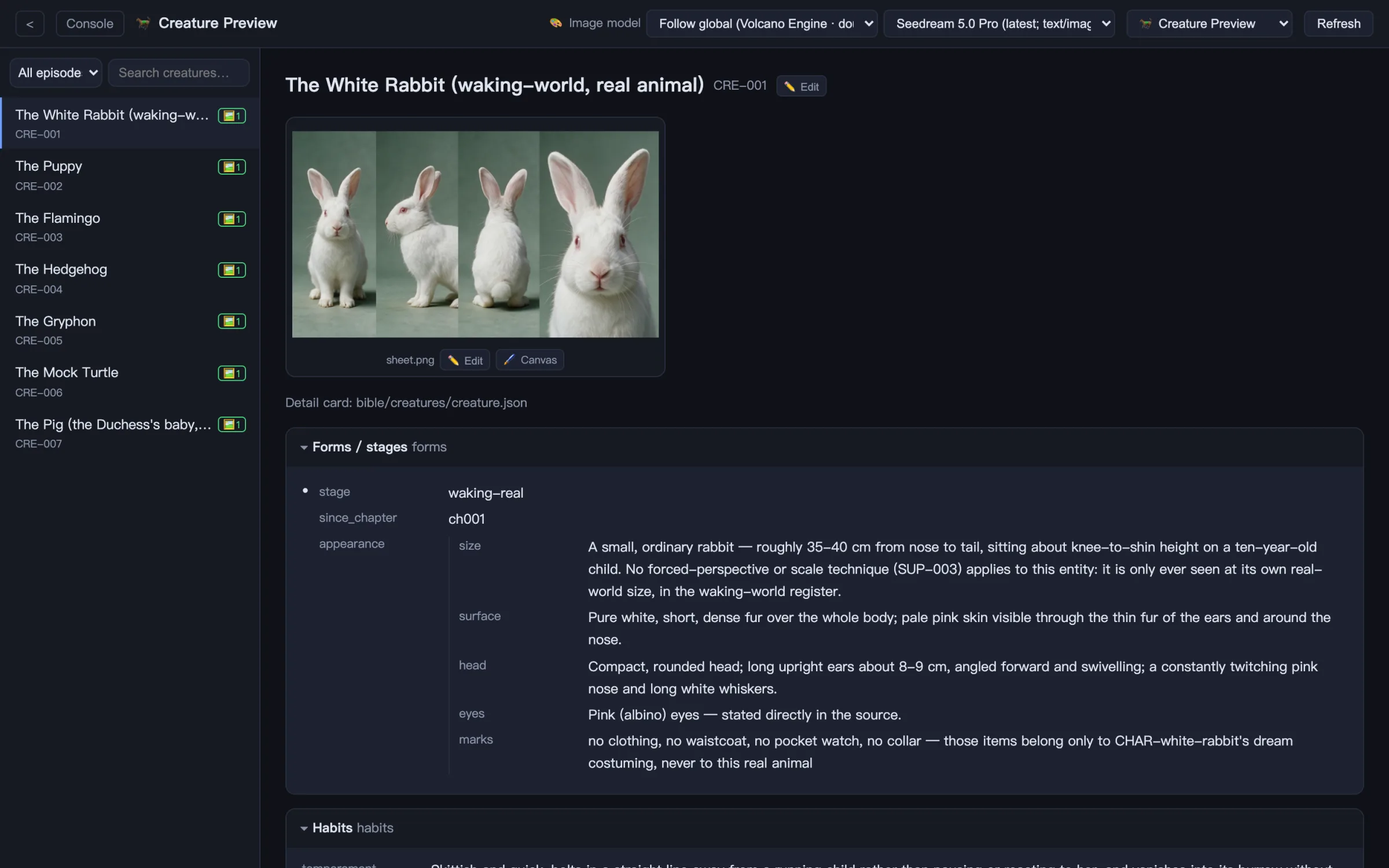
The list on the left shows every creature with its type and 🖼 with the number of images. Search creatures… matches IDs, names and types. The episode menu shows only the creatures in one episode.
The details on the right:
- Name, ID, type, Construct for made beings, and ✏️ Edit.
- Chapters, tech and dictionary references, and a one-line summary.
- The images. Subfolders such as
candidates/appear as folder cards. Click an image to see it full size. - Detail card: the file the card comes from, then one foldable section per part of the card. Known parts come first: Anatomy, Locomotion, Ownership, Tack & gear, Mount performance, State log, Maintenance, Rampage behavior, Screen usage, Visual identifiers, Forms / stages, Habits, Combat, Appearances and so on; anything else follows.
- Registry entry, folded: the creature's entry in
index.json.
🎨 Image model at the top sets the channel and model used when creature sheets are drawn. Follow global uses the image setting on the 🎨 Generation Models page. See Image models.
Ask for a change
- ✏️ Edit next to the name sends notes about the creature's card to the Reviser, who works as the creature and creature-concept agents would.
- ✏️ Edit under an image sends notes about that sheet.
- 🖌 Canvas under an image opens it in the Canvas to mark exactly what to change.
See The Reviser and revision notes.
A creature or a character?
Talking animals can be either, or both. In the sample project alices, the White Rabbit of Alice's dream is a character with a voice and costumes, the real rabbit she sees on the riverbank is creature CRE-001, and the Gryphon has a character entry plus a creature card linked to it. If something is registered the wrong way for your story, say so with ✏️ Edit or in the console chat.
Files
| What | Where |
|---|---|
| Creature registry | bible/creatures/index.json |
| Creature cards | bible/creatures/creature.json |
| Mount cards | bible/creatures/mount.json |
| Sheets | assets/concepts/creatures/<id>/sheet.png, sheet_<stage>.png |