Network check
The agent engines (Claude Code, Codex and the others) are command-line programs that run on the computer hosting VideoAgents. A VPN that works in your browser does not always cover them. Network Check tests the connection the way those programs see it, so you can tell whether a failing engine or download is a network problem.
Run the check
Open ⚙️ → Advanced → Network Check. The check starts at once and takes a few seconds. Click ↻ Re-check to run it again, for example after changing VPN settings.
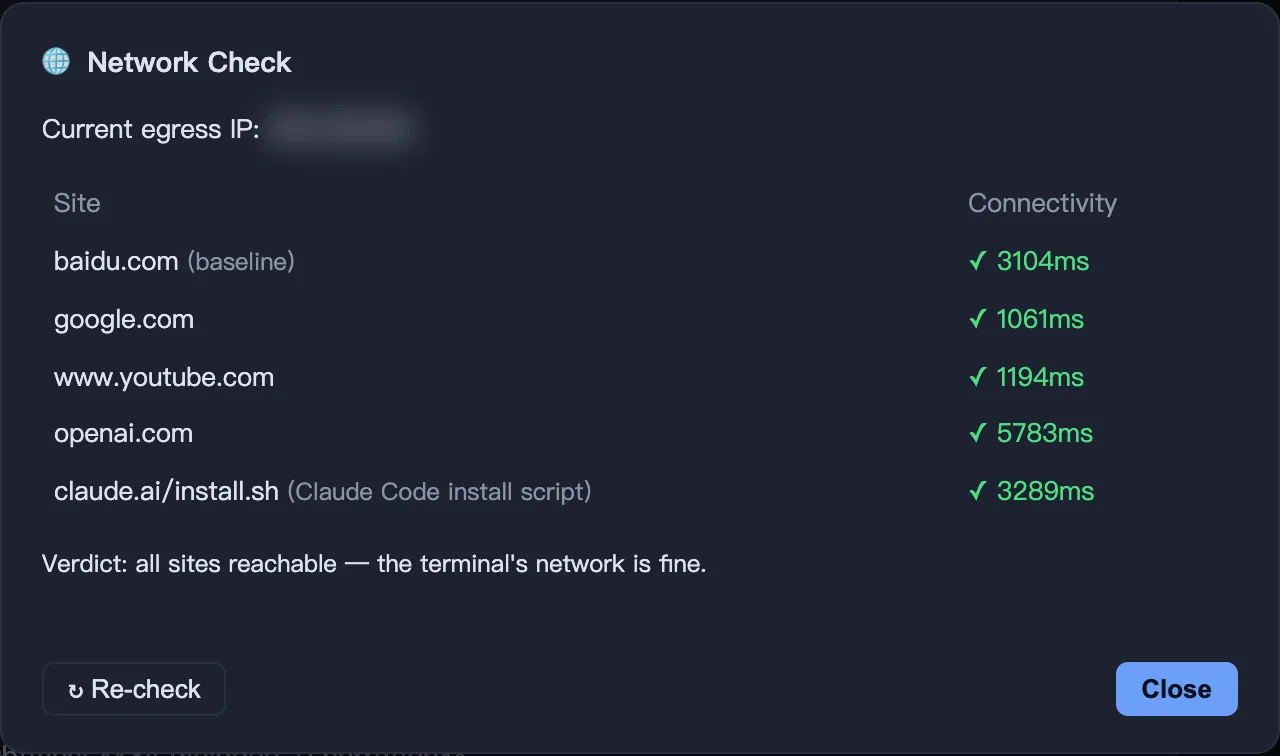
The dialog shows:
- Current egress IP: the public IP address your traffic leaves from, with its location and network provider. Use it to confirm that your VPN or proxy is in effect.
- A table of sites with ✓ and the response time, or ✗ and the error:
| Site | Why it is tested |
|---|---|
| baidu.com (baseline) | A site reachable from almost anywhere, used to check that the network works at all |
| google.com | Google services |
| www.youtube.com | YouTube, used for example when you import footage by link |
| openai.com | OpenAI services |
| claude.ai/install.sh (Claude Code install script) | Installing and updating Claude Code |
Read the verdict
| Verdict | What it means | What to do |
|---|---|---|
| Verdict: all sites reachable — the terminal's network is fine. | The network is not the problem | Look elsewhere: engine login, provider keys, quota |
| Verdict: the network is fine but some overseas sites are unreachable… | The baseline works but some sites are blocked | Turn on your VPN's TUN (global) mode so it covers command-line programs, then re-check. Astrill users: switch the protocol to StealthVPN, OpenVPN or WireGuard. |
| Verdict: even the baseline site is unreachable… | The network itself seems down | Check your internet connection first; this is not a VPN issue |
When to use it
- An engine fails to install, log in or answer.
- Runs end with network errors such as dropped or timed-out API connections.
- You just changed VPN or proxy settings.
The check only reads; it changes no settings.