Set up providers
Providers are the services that generate your media: images, video, voices, music, sound effects and more. You choose one provider for each kind of media on the Generation Models page, so you can mix vendors and switch when a better model ships.
The agent engine is set up separately. It runs the agents; providers make the pictures and sound they ask for.
Before you start
- Decide which services you will use, and create accounts and API keys with them. Many provider tabs on the Generation Models page link to the provider's site.
- In the desktop app, if you signed in to your Agentics account, the default providers already work without keys.
Open the Generation Models page
Open ⚙️ → Generation Models. The page is titled Generation Model Settings and has one card per kind of media.
Changes save automatically: text and key fields when you leave them or press Enter, menus and checkboxes as soon as you change them. There is no save button.
Set up a card
- In the card's title bar, open Active provider and choose the service to use. This is what the agents will call.
- Click that provider's tab to see its settings. The active provider's tab has a ✅.
- Enter the API key and pick a model. Some providers have extra fields, such as a site or region, or a test button.
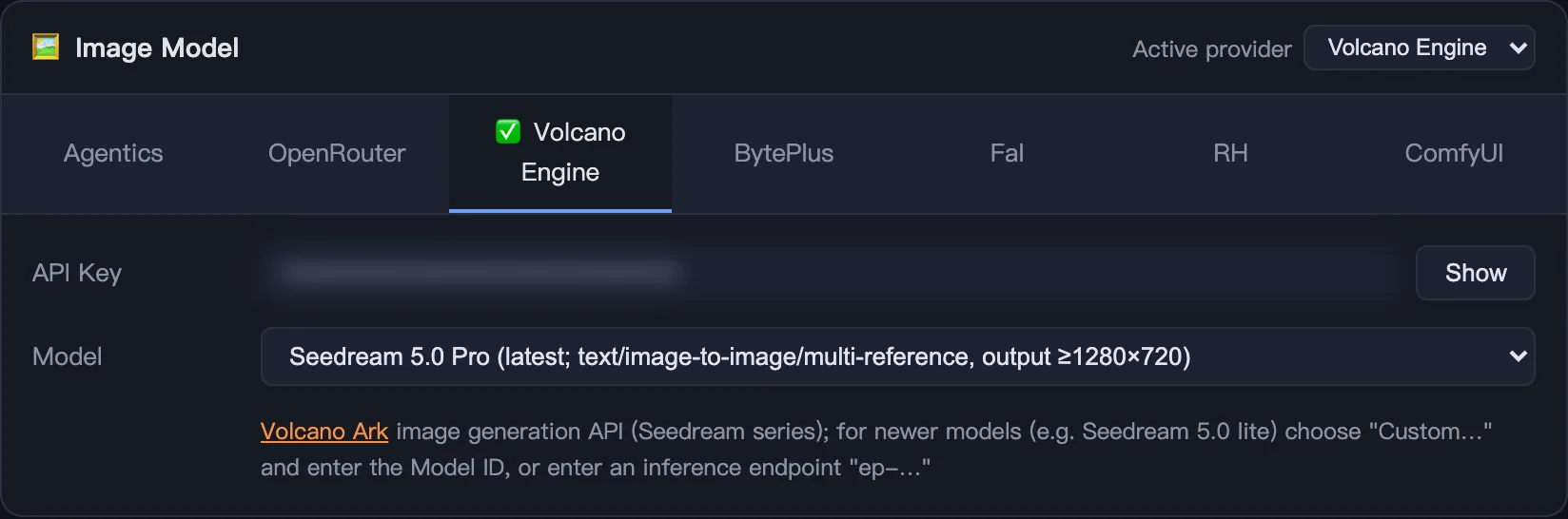
Tabs are only for viewing and editing. You can change the settings of a provider that isn't active; it isn't used until you choose it in Active provider.
The cards
| Card | What it makes | Providers | Default on a new install |
|---|---|---|---|
| 🧩 Language Model / Agentics | The language model for the built-in agentics engine only | Agentics, Local model, Cloud model | Agentics |
| 🖼 Image Model | Concept art, reference sheets, sketches, keyframes and plates | Agentics, OpenRouter, Volcano Engine, BytePlus, Fal, RH (RunningHub), ComfyUI | Agentics |
| 🎬 Video Model | The video for each generation group, with its native dialogue and sound | Agentics, OpenRouter, Volcano Engine, BytePlus, Fal, RH, ComfyUI | Agentics |
| 🎙 TTS Voice Model | Character voice samples, narration and dubbing | Agentics, OpenRouter, Volcano Engine, ElevenLabs, MiniMax, ComfyUI | Agentics |
| 🎵 Music Model | Background music | Code composition, Agentics, OpenRouter, ElevenLabs, ComfyUI | Code composition (Agentics on a new desktop install) |
| 🔊 SFX Model | Sound-effect patches | Code SFX, Openverse, ElevenLabs, Fal | Code SFX |
| 🧑 Digital Human | Speaker video for digital human projects | Agentics, HeyGen, Kling AI, ComfyUI | Agentics |
| 🔍 Upscale | The final resolution from draft-resolution video | ffmpeg, Agentics, Volcano Engine, MiniMax, ComfyUI | ffmpeg |
| 🌍 World model | Explorable 3D worlds for scenes | World Labs, HunyuanWorld | World Labs |
| 🧊 3D models | 3D models from reference images | Tripo, Fal, RH, Local Hunyuan3D | Tripo |
| 🛡 Moderation model | Judges refused requests in NSFW mode | Agentics, OpenRouter | Agentics |
The Agentics providers bill your Agentics account and need the desktop app with that account signed in. Code composition, Code SFX and ffmpeg run on your computer and cost nothing. Openverse finds existing free sound effects instead of generating them.
TIP
The 🧊 3D models card was added after v1.0.45. If you don't see it, update VideoAgents.
What a first film project needs
For a film or series, set up at least:
- Image Model and Video Model.
- TTS Voice Model, for character voice samples.
- Music Model and SFX Model can stay on Code composition and Code SFX to begin with.
- Language Model / Agentics only if your engine is agentics.
The other cards matter only for the features that use them, such as world models, 3D models or digital human projects.
WARNING
Image, video, voice and music generation is billed by the provider. Check each provider's prices before you start, and see Cost control for the settings that keep spending down.
Object storage for reference videos
Some video models only accept reference videos at a public web address; Volcano Engine (Seedance) is one of them. VideoAgents then uploads the local file to object storage and passes the model a temporary link. If you plan to use reference videos, for example the camera pass from a 3D whitebox, set up a storage service under ⚙️ → Storage & Image Libraries. See Object storage and stock libraries.
Per-page overrides
Some preview pages have their own model menus in the top bar. For example, Character Preview has an Image model menu. When it is set to Follow global, the page uses the Generation Models setting.
Learn more
Each kind of media has its own page with the models, settings and limits:
- Image models
- Video models
- Voice models
- Music and sound models
- Digital human models
- Upscale
- 3D model providers
- ComfyUI (local, Comfy Cloud or RunningHub)