Video models
The video model turns each generation group (a run of shots with its prompt and reference images) into a clip. It is usually the largest cost in a project, so pick it with care and set the project's limits to match it.
Open the settings
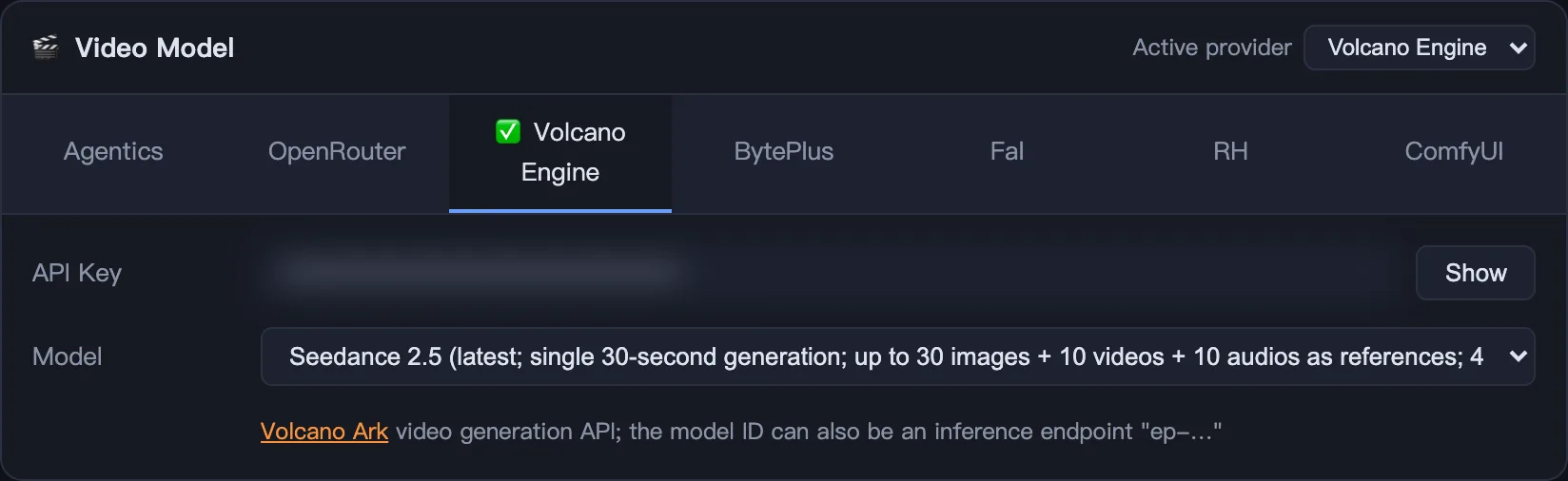
- Open ⚙️ → Generation Models.
- Find the 🎬 Video Model card.
- Click a tab to see or edit a provider's settings.
- Choose the provider agents should use in Active provider in the card's title bar. The ✅ marks it.
Changes save automatically.
Providers
| Tab | What it is | What you enter | Default model |
|---|---|---|---|
| Agentics | Your VideoAgents desktop account | Nothing; sign in. Pick a Model from your account's list | — |
| OpenRouter | Video models on OpenRouter | API Key, Model | Seedance 2.0 |
| Volcano Engine | Seedance on Volcano Ark | Ark API Key, Model | Seedance 2.5 |
| BytePlus | Seedance on BytePlus ModelArk (outside China) | ModelArk API Key, Model | Seedance 2.5 |
| Fal | Video endpoints hosted on fal.ai | API Key, Model | MiniMax H3 Max |
| RH | RunningHub's standard model API | Provider (site), API Key, Model | rhart-video/sparkvideo-2.0/multimodal-video |
| ComfyUI | Your own workflows on a local ComfyUI, Comfy Cloud or RunningHub | See ComfyUI | — |
New installs use Agentics as the active provider.
Built-in model choices
Volcano Engine: Seedance 2.5 (one generation up to 30 seconds, up to 30 images + 10 videos + 10 audios as references, 480p / 720p), Seedance 2.0 (sound and picture together, up to 4K), Seedance 2.0 Fast and Seedance 2.0 Mini (480p / 720p). Custom… takes another model ID or an inference endpoint ID (ep-…).
BytePlus: the same Seedance 2.5 and 2.0 family, plus Seedance 1.0 Pro and 1.0 Pro Fast.
Fal: MiniMax H3 Max, H3, H3 Max Turbo and H3 Max Lip Sync, Seedance 2.5 and 2.0, Wan 3.0, Kling 4.0, and Kling 3.0 Pro / Standard. Each entry in the menu lists its durations, resolutions and reference limits. You enter a model family; the right endpoint (text-to-video, image-to-video or reference-to-video) is picked from what each job sends. Search Fal models finds other models; see Image models for how search works. The Fal key is shared with the Image Model card.
OpenRouter: the model list comes from OpenRouter's video catalog, with recommended models on top (⭐), such as Seedance 2.5 / 2.0, MiniMax H3, Kling 3.0, Wan 3.0, Veo 3.1, FLUX.3 Video, Runway Gen-4.5, Grok Imagine Video and Sora 2 Pro. Verify Key checks the key.
RH: pick the site (runninghub.ai or runninghub.cn) and its key. The model menu is read from RunningHub's documentation the first time you open the tab (about a minute). VideoAgents switches between the endpoints of the chosen model by input (first and last frames, reference assets or text only) and uses the closest duration, resolution and aspect ratio the model supports.
MiniMax: a tab for MiniMax-H3 exists but is hidden unless it is already active.
Match the project to the model
Video models differ in how long one generation can be and how many reference images, videos and audios they accept. Each project stores these limits under 🎛️ → Model Limits, with presets for Seedance 2.0, Seedance 2.5, MiniMax H3 and Wan 3.0 (and Kling 4.0). When you create a project, the wizard picks the preset that matches the video model in effect.
When you switch to a model with different limits, update Model Limits too. For example, before using Seedance 2.5, raise the group duration and reference limits. See Model limits.
Some models also load a matching prompt skill automatically, so the Prompt Agent writes in the style that model expects (for example wan3-pe for Wan 3.0 and kling4-pe for Kling 4.0 on Fal). See Video prompts and prompt skills.
Use a different model for one episode or group
The Storyboard Preview page has a video provider menu at the top for the current episode, and each group's 🎛 Group Video Model dialog can switch that group to another provider and model. The Generation Models setting stays the default for everything else. See Storyboard preview.
Resolution
The project's 🎛️ → Output Settings sets two resolutions:
- Draft resolution is used while you iterate and review.
- Final-cut resolution is the target after you sign off. When it differs from the draft, the final version comes from upscaling, not from generating again.
Higher resolution costs more. Pick the upscale method on the Upscale card. With Seedance 2.5 on Volcano Engine, the Upscale card also offers a draft mode that renders the 1080p final from the approved 480p draft.
Good to know
- Each generation records the model, provider and references it used. For Volcano Engine, the token usage of each clip is also written to the clip's
.meta.jsonand tousage_ledger.jsonlin the same folder, and the Workflow Preview totals it as Video tokens used. - A Fal job that was interrupted is picked up when the same generation runs again with the same prompt and references, instead of being submitted and billed twice.
- When NSFW mode is on, flagged groups can use a separate fallback video model, and a content rejection from the main provider can switch to it once. See NSFW mode.
- Volcano Ark rejects reference images that look like real people unless they are in the Virtual portrait library.
Troubleshooting
A group fails with a duration or reference-count error. The project's Model Limits exceed what the model accepts. Pick the preset for your model.
A Volcano Engine video is rejected for privacy or sensitive content. For faces, register the character images in the Virtual portrait library. Reference videos sent to Volcano Ark need object storage.
Choosing Agentics jumps back to the previous provider. It needs the desktop app and a signed-in account.