Costumes
Characters change clothes: a court dress for the trial, a muddy cloak after the battle. VideoAgents plans every character's wardrobe, draws one sheet per outfit with the same person in different clothes, and attaches the right sheet to each shot, so the costume does not drift back to the default.
How costumes are made
- The wardrobe. In Phase 4 of the workflow, after the art style is set, the costume agent builds a wardrobe for every S, A and B character: outfits by occasion (daily, formal, battle, special) and by period of the story. It marks the change points, the event after which a character switches to another outfit, and picks one default outfit per character. The result is
bible/costumes.json. - The character sheet in the default outfit. The character sheet (
sheet.png) is drawn in the default outfit, so it doubles as that outfit's sheet. - One sheet per extra outfit. The costume-concept agent draws each non-default outfit as a full four-view sheet,
sheet_<outfit-id>.png, using the character sheet as the face and body reference. It records every outfit in a ledger,costume_sheets.json, next to the images.
When an episode is prepared, the art director checks that every outfit its shots need has a sheet, and orders the missing ones.
What an outfit records
| Field | Meaning |
|---|---|
| ID and label | For example COS-001, "Blue summer frock and white pinafore" |
| Occasion and period | When the outfit is worn |
| Default | Whether it is the character's default outfit |
visual_en | A complete description of the outfit: layers, materials, colours, wear. It is used word for word in the prompts for the outfit's sheet and for the shots where the character wears it |
| Variants and condition | States of the same outfit, such as "soaked" or "torn", described as differences |
| Chapters, episodes, scenes | Where the outfit appears |
Because each outfit's description must stand on its own, a sheet can be drawn from it without reading the others. Small states such as "soaked" stay variants of an outfit and are carried by the wording of the shot's prompt; they do not get a sheet of their own.
An outfit can also be skipped (for example, when it cannot be told apart on screen) or blocked (for example, when the age version it belongs to has no character sheet yet). Both show the reason.
Review costumes
On the Character Preview page
Open 👤 Character Preview from the Preview design outputs menu and pick a character. The 👕 Costumes section below the images shows how many outfits the character has and how many have sheets. The 👕 badge in the character list shows the same count, such as 2/2.
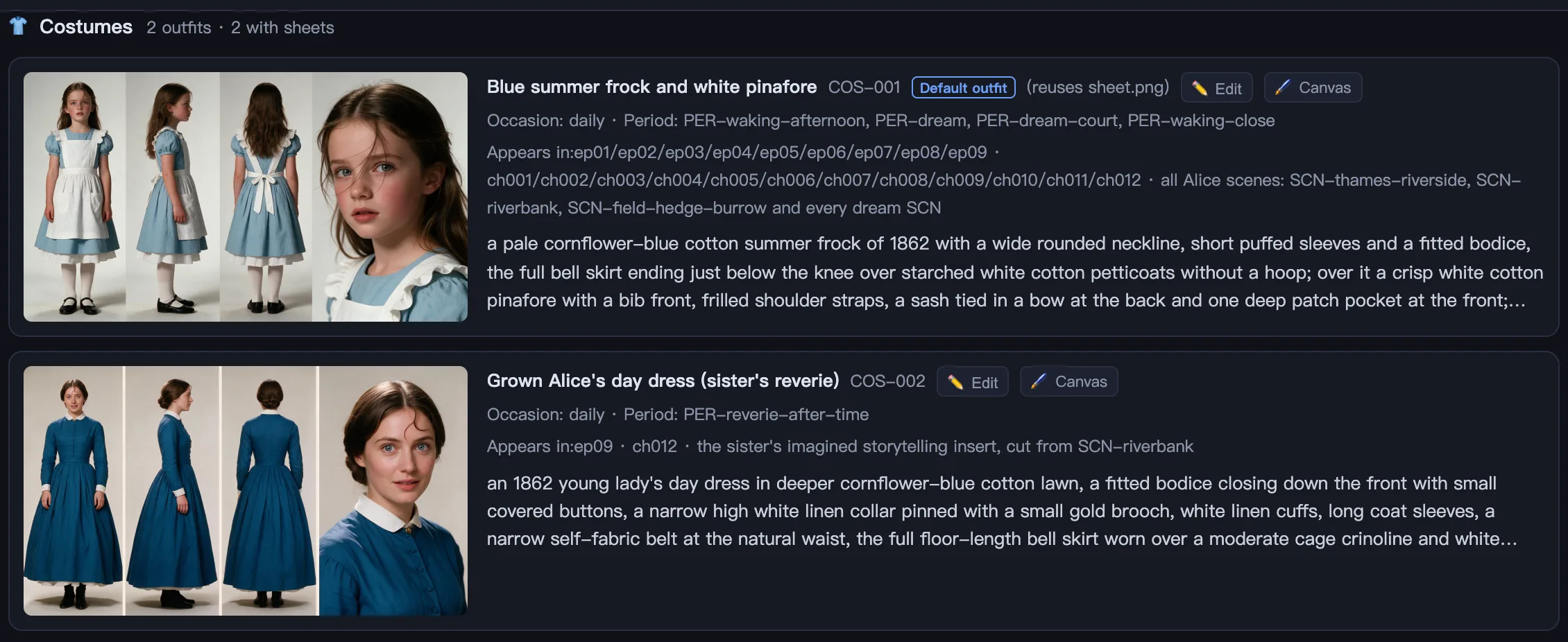
Each outfit card shows:
- The sheet, or Not drawn yet, Blocked: … or Skipped: … in its place. Click the sheet to see it full size.
- The label and ID, Default outfit and "(reuses sheet.png)" for the default.
- Occasion, Period, Appears in (episodes, chapters, scenes) and Sub-states.
- The outfit description. Click it to expand or collapse it.
- A warning when an image exists but is not in the ledger.
On the Storyboard preview, the 👕 chip of a character in a generation group links to that outfit on this page and highlights it.
On the Worldview Preview page
🌍 Worldview Preview → Costumes shows the whole of costumes.json, including each character's occasion matrix and the list of change points.
Ask for a change
- ✏️ Edit on an outfit card sends notes about that outfit's description or sheet to the Reviser. The Reviser works as the costume and costume-concept agents would.
- 🖌 Canvas on a drawn sheet opens it in the Canvas.
If you change an outfit's look on the Canvas, tick the option to send the change to the Reviser when you set the final version, so the outfit description is updated too.
Use your own costume references
Put costume images in the 🗡 Props or 👤 Characters section of the Reference Files page and say in the note which outfit they show, for example "Alice's pinafore, COS-001". The costume agents use them first.
Files
| What | Where |
|---|---|
| Wardrobe and change points | bible/costumes.json |
| Default outfit sheet | assets/concepts/characters/<id>/sheet.png |
| Other outfit sheets | assets/concepts/characters/<id>/sheet_<outfit-id>.png |
| Ledger of which sheet belongs to which outfit | assets/concepts/characters/<id>/costume_sheets.json |