Long takes and continuity
A video model makes one generation group at a time, so a scene that spans several groups can jump at each group boundary. With Long take on, each group in a scene continues from the previous group: from its last frame, or from its last two to three seconds of video.
How continuity works
Continuity between groups always starts with planning. For each episode, the Continuity Planning Agent records costume, prop and lighting states shot by shot and marks every group boundary (directing/<ep>/continuity.json):
- continuous: the same action or camera move carries on across the boundary, so the next group must not open on a new framing, and characters must not jump to a new position.
- cut: a reverse shot or new framing in the same scene, carrying over the setting, light and positions.
- no link: a boundary between scenes, or one with a transition such as a dissolve or fade. These never chain.
What happens at a same-scene boundary depends on the project setting:
| Long take | What the next group receives |
|---|---|
| Off (default) | Nothing from the previous clip. Continuity is carried by the prompt text, the character and scene references and, with the whitebox on, the whitebox camera video. Groups can be generated in parallel |
| On, Last-frame image | The previous group's last frame as a reference image |
| On, Tail video clip | The previous group's last 2–3 seconds of video, which the model extends forward |
The continuous or cut marking only changes the opening sentence written into the next group's prompt (extend the action, or continue the scene with a new framing). It does not change which material is attached.
Turn on long takes
- Open 🎛️ → Video Rhythm.
- Tick Long take.
- Choose the Join method: Last-frame image (default) or Tail video clip.
- Click OK.
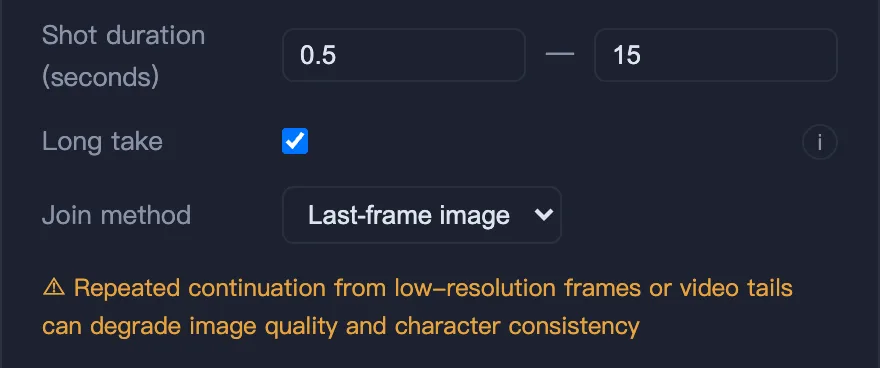
You can also set both in the new-project wizard. The setting applies to groups whose prompts are written or updated after you save.
TIP
Long take is available from v1.0.28 and Join method from v1.0.36.
What changes when it is on
- Groups are generated in order. In a chained scene, a group waits until the previous group's clip exists, because it needs that clip's last frame or tail.
- The previous clip's last frame is saved next to the clip as
assets/clips/<ep>/<group>.last_frame.png(it is saved whether or not long takes are on). - Tail clips are cut into
assets/continuity/<ep>/<group>.continuation.mp4: at most 3 seconds, at the original resolution, without sound so old dialogue is not repeated. They live apart from the finished clips so they are never picked for the edit. - Character, scene and whitebox references stay. The continuation material is added to them. With a tail video, the last frame image is not attached as well.
When the tail video falls back to the last frame
The tail video needs a model that accepts reference videos and room in the group's video budget. VideoAgents falls back to the last-frame image, and records why, when:
- the model does not accept reference videos,
- the continuous part at the end of the previous clip is shorter than 2 seconds, or
- the group's reference-video budget cannot fit even 2 seconds (with less room, the tail is shortened first).
Fal Kling 4.0 accepts reference videos but needs each to be at least 3 seconds, so it always continues from the last-frame image. Endpoints that take only first and last frames (for example Fal Kling 3.0 and MiniMax H3 Max Turbo) cannot take references at all and use a first/last-frame fallback instead.
If the previous clip ends on black, continuation is blocked rather than chaining from a black frame. Fix the previous group or make the boundary a deliberate transition.
See the chain on the storyboard
On 🎦 Storyboard Preview, the header of each group shows its place in the chain:
| Chip | Meaning |
|---|---|
| ◦ Group chain start | The first group, with nothing before it |
| ⛓ Continue from grp004's last frame | Chained on the last frame |
| ⛓ Continue from grp004's video tail | Chained on the tail video |
| ✂ Hard cut from grp001 (no last frame) | A break: nothing is carried over |
| ⚠ after a chip | The prompt's references and the continuity plan disagree; hover for details |
Until the previous clip exists, its last frame shows as a ⏳ Waiting for previous group's clip tile among the reference images.
Regenerating a group in a chain
A chain runs forward: if you regenerate a group, the next group was made from the old clip's ending.
- Groups that have not been generated yet are prepared again from the new clip.
- Groups that were already generated keep the old continuation. Watch the seam between the two groups again, and regenerate the next group if it jumps.
Small fixes that keep the clip's motion (a video-to-video edit of a prop or costume detail) leave the ending almost unchanged, but the seam is still compared.
Good to know
- Continuation is a soft link, not a pixel-perfect join. Chaining from low-resolution frames or tails again and again can slowly degrade image quality and character likeness, which is why the dialog shows a warning.
- With Volcano Engine and Seedance 2.x, the provider may reject realistic faces in a last frame or tail. If the Virtual Portrait Library is enabled, VideoAgents enrolls that material in the library before submitting it (from v1.0.39). See Virtual portrait library.
- Turning Long take off removes the continuation material and sentences from the prompts the next time they are updated, and keeps the ordinary character, scene and whitebox references.