Local API
Everything the console does goes through a versioned HTTP API under /api/v1, and you can call the same API from your own scripts or tools: send a message to an agent, follow its run, answer a sign-off, or read files from a project. Interactive documentation for every endpoint is built in.
No sign-in
The API has no accounts, passwords or tokens. Anything that can reach it can read your projects and provider keys, change settings, start agents that run commands on your computer, and spend your provider credits. Keep it on your own computer. See Security and LAN access.
Find the address
| How you run VideoAgents | API base URL |
|---|---|
From source (videoagents-web, make run) | http://127.0.0.1:8630/api/v1, or the port you set with VIDEOAGENTS_PORT |
| Desktop app | The app picks a free port each time it starts. Hover the connection dot in the console's top bar; its tooltip shows the Web and API ports. Use the Web port. |
Call the API through the same address as the console. The console's web server forwards /api/v1 to a separate API service that only listens on 127.0.0.1 (port 8640 by default). Calling the API service's port directly works too, from the same computer.
GET /api/v1/runtime on the console's address returns both ports.
Open the API docs
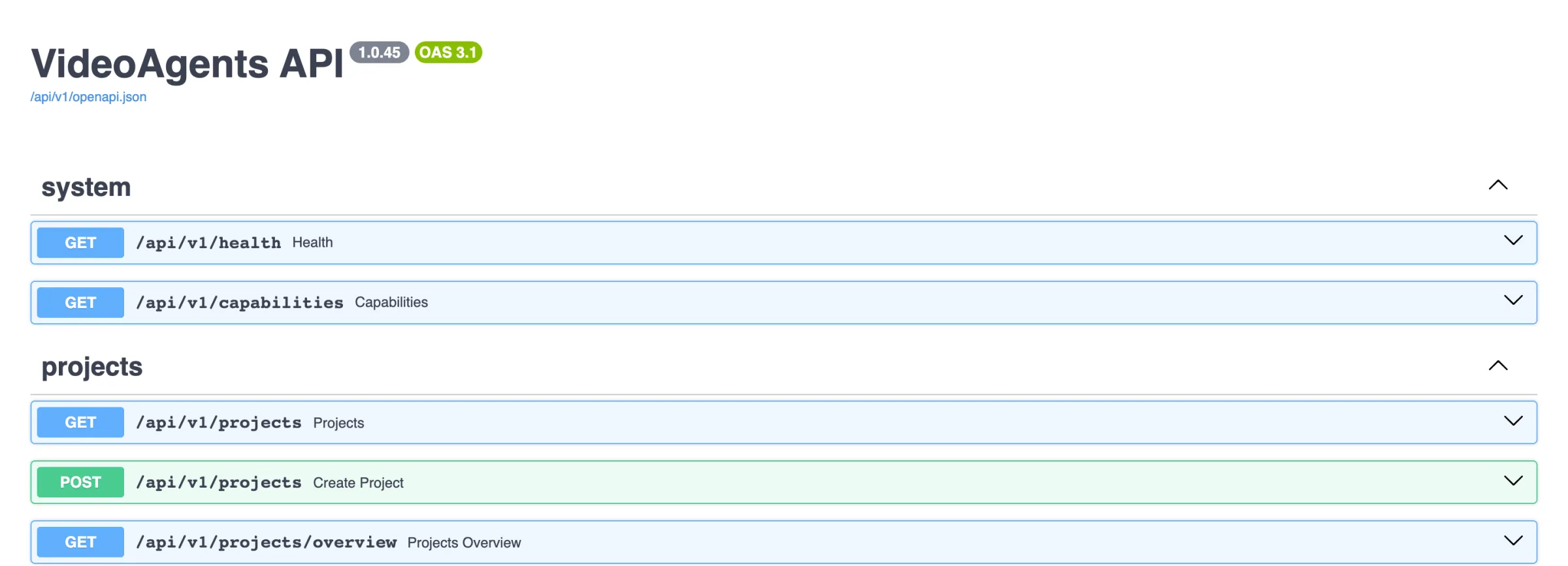
Open /api/v1/docs on the console's address, for example http://127.0.0.1:8630/api/v1/docs. The page lists every endpoint grouped by area, and you can expand one to see its parameters and try it. The machine-readable OpenAPI description is at /api/v1/openapi.json, for generating clients.
TIP
Try it out in the docs page sends real requests. A POST there changes your data exactly as the console would.
What's in the API
v1.0.45 has about 285 paths. They are grouped like this in the docs:
| Group | Covers |
|---|---|
| system | health (version check) and capabilities |
| projects | Listing, creating, importing, copying and deleting projects; creative brief, project settings, project skills, prompt skill |
| agents | The agent list, per-agent model settings, each agent's SOUL.md |
| runs | Sending messages (starting runs), run status, stopping runs, adding to a running task, chat history, Reviser records |
| approvals | Confirmations and sign-offs waiting for an answer |
| events | The live event stream, see Live events |
| artifacts | Project files and the data behind the preview pages (world bible, characters, scenes, storyboard and more) |
| storyboard | Storyboard, sketches, group and episode settings |
| configuration | Generation models, global model, engines (install, sign-in, version) |
| automation | Auto-run, agent advanced settings, skills, concurrency, agent memory, full-auto mode |
| providers | Provider tests and model lists |
| plugins | Listing, installing, enabling and deleting plugins |
| resources | Resource Usage data and its settings |
| footage, live, avatar-assets, voice-input, wechat, feishu, whatsapp, network, nsfw, diagnostics | The pages of the same names |
Conventions
- Reading uses
GET; changing something usesPOST, with a JSON body. A few deletions useDELETE. - Many bodies are free-form JSON objects, so the docs page shows them only as "object". To see exactly what to send, do the same thing in the console with your browser's developer tools open and look at the request on the Network tab.
- Errors come back as
{"detail": "…"}with an HTTP status such as 400, 404 or 409. Some messages are in the console's interface language, some only in Chinese. - An
/api/…path that doesn't exist returns404withUnknown API endpoint: …. - Agent ids contain a slash, for example
00-orchestration/workflow-orchestrator. Where an agent id is part of the path (as in/agents/{agent}/messages), you can write the slash as is. - Installing, signing in to and updating agent engines is only allowed from the computer running VideoAgents.
Common tasks
The examples use curl against the default source address. Set API to your own base URL.
API=http://127.0.0.1:8630/api/v1Check the service and list things
curl -s $API/health          # {"status":"ok","version":"1.0.45","api_version":"v1"}
curl -s $API/projects        # ["alices", ...]
curl -s $API/agents          # [{"id": "...", "name": "...", "category": "...", ...}, ...]
Send a message to an agent
POST /runs is what the console's Send button does. It starts a run and returns its id.
curl -s -X POST $API/runs \
  -H 'Content-Type: application/json' \
  -d '{"project": "alices",
       "agent": "00-orchestration/workflow-orchestrator",
       "message": "Show me the status of ep01."}'
# {"run_id":"3f2a9c1b7d4e"}| Field | Required | Meaning |
|---|---|---|
project | Yes | Project name |
agent | Yes | Agent id |
message | Yes | The message text |
engine, model | No | Engine and model. Left out, the agent's own model settings or the top bar's global choice apply, as in the console. |
Chat commands such as /auto on or /stop all work in message too. They are handled at once and start no run.
Follow a run
curl -s $API/runs/3f2a9c1b7d4eThe reply includes status (queued, running, done or error), error, the engine and model, recent activity and files, and, once it has finished, the agent's reply in result. GET /runs lists the latest 100 runs of all projects. For live updates instead of polling, use Live events.
To read the conversation the console shows:
curl -s "$API/projects/alices/agents/00-orchestration/workflow-orchestrator/messages?limit=20"Stop runs
curl -s -X POST $API/runs/3f2a9c1b7d4e/cancel    # one run
curl -s -X POST $API/runs/cancel                 # every running and queued run, like ⏹ Stop
Answer a confirmation or sign-off
curl -s $API/approvals                           # questions waiting for an answer
curl -s -X POST $API/approvals/<id>/answer \
  -H 'Content-Type: application/json' -d '{"answer": "sign off"}'
Each approval has a kind: sign for a sign-off gate, confirm for a question such as retry or skip. Answer a sign-off with sign off or hold, a confirmation with rerun or skip, or with one of the approval's own options. A sign-off can still be refused with an error, for example when the gate's checks aren't met.
Read a project file
curl -s $API/projects/alices/artifacts/story/episodes/ep01/screenplay.md
curl -s -o grp001.mp4 $API/projects/alices/artifacts/assets/clips/ep01/grp001.mp4
Any file inside the project folder can be read this way; see Project folder for where things are.
A small Python client
import json, time, urllib.request

API = "http://127.0.0.1:8630/api/v1"
direct = urllib.request.build_opener(urllib.request.ProxyHandler({}))  # skip system proxies for 127.0.0.1

def call(path, body=None):
    req = urllib.request.Request(API + path, method="POST" if body is not None else "GET",
                                 data=json.dumps(body).encode() if body is not None else None,
                                 headers={"Content-Type": "application/json"})
    with direct.open(req) as r:
        return json.load(r)

run_id = call("/runs", {"project": "alices",
                        "agent": "00-orchestration/workflow-orchestrator",
                        "message": "Show me the status of ep01."})["run_id"]
while (run := call(f"/runs/{run_id}"))["status"] in ("queued", "running"):
    time.sleep(5)
print(run["status"], run.get("result") or run.get("error"))
Install a plugin from the command line
The plugin installer takes the zip as the raw request body:
curl -X POST --data-binary @dist/my-plugin-1.0.0.zip $API/pluginsIt is installed disabled, as from the Plugins dialog. See Install plugins.
Good to know
- Runs, confirmations and the event log are kept in a SQLite file in the data folder (
.videoagents/runtime.sqlite3), so they survive a restart. Runs that were still running when the service stopped are marked as errors. videoagents-apistarts the API service without the console. On its own it listens onVIDEOAGENTS_HOST:VIDEOAGENTS_PORT(127.0.0.1:8630 by default), so don't run it next tovideoagents-webon the same port. See Command line.- Some system proxies on macOS intercept requests to
127.0.0.1. If calls fail with proxy errors, bypass the proxy for local addresses, as the Python example does.