Characters
Every character in your story gets an ID, a written profile and, for the main cast, a character sheet: one image with the character from the front, side and back and a large head-and-shoulders close-up. That sheet is the reference every later image and video uses, so the character looks the same in every shot. You review all of it on the 👤 Character Preview page.
How characters are made
| Step | Agent | Result |
|---|---|---|
| Register | character-manager | Every character in the novel, extras included, gets a unique ID (such as CHAR-0001 or CHAR-alice). Aliases and former names are merged, people who share a name are split, and each character gets a tier: S (lead), A (major), B (supporting) or extra |
| Profile | appearance, personality, dialogue-style, relationship, character-growth | Appearance (including gender), personality and motives, way of speaking, relationships, and age versions for characters who age during the story |
| Voice | voiceprint, then voice-generation | A voice card and a short voice sample. See Voices |
| Costumes | costume, then costume-concept | The wardrobe and one sheet per extra outfit. See Costumes |
| Character sheet | character-concept | The sheet for each S and A character, drawn in the art style and the character's default outfit |
The profiles are written in Phase 3 of the workflow and checked by the Characters & assets sign-off (H1A), together with creatures and scenes. The sheets are drawn in Phase 4, after the art style is set, and the main characters' sheets are part of the Art style lock (H2). See Sign-off gates.
Supporting characters who first appear in a later episode get their sheet when that episode is prepared: before each episode's storyboard is signed, the art director checks that every character in it has a sheet and orders the missing ones.
About the character sheet
- One image, at least 2560×1440, with full-body front, side and back views and a head-and-shoulders close-up side by side. It is never cut into separate pictures; video generation uses the whole sheet.
- One image per character is drawn, not a batch to choose from. If the agent's own check finds a problem, it redraws only within the retry count you set (⚙️ → Advanced → Agent Advanced Settings → Retry count; the default 0 means it reports the problem to you instead).
- Characters with age versions get one sheet per version (
sheet_<version>.png). - Images in
refs/characters/whose note names the character are used as references for the sheet. See Reference files.
Where the files are
| What | Where |
|---|---|
| Character list, IDs, aliases, tiers | bible/characters/index.json |
| Profile of one character | bible/characters/<id>/ — appearance.json, personality.json, dialogue_style.json, voice.json, age_versions.json |
| Relationships between characters | bible/characters/relationship.json |
| Sheets | assets/concepts/characters/<id>/sheet.png (plus age-version and costume sheets) |
| Earlier attempts | assets/concepts/characters/<id>/candidates/ |
Review characters on the Character Preview page
Open the Preview design outputs menu (the picture icon in the console's top bar) and choose 👤 Character Preview.
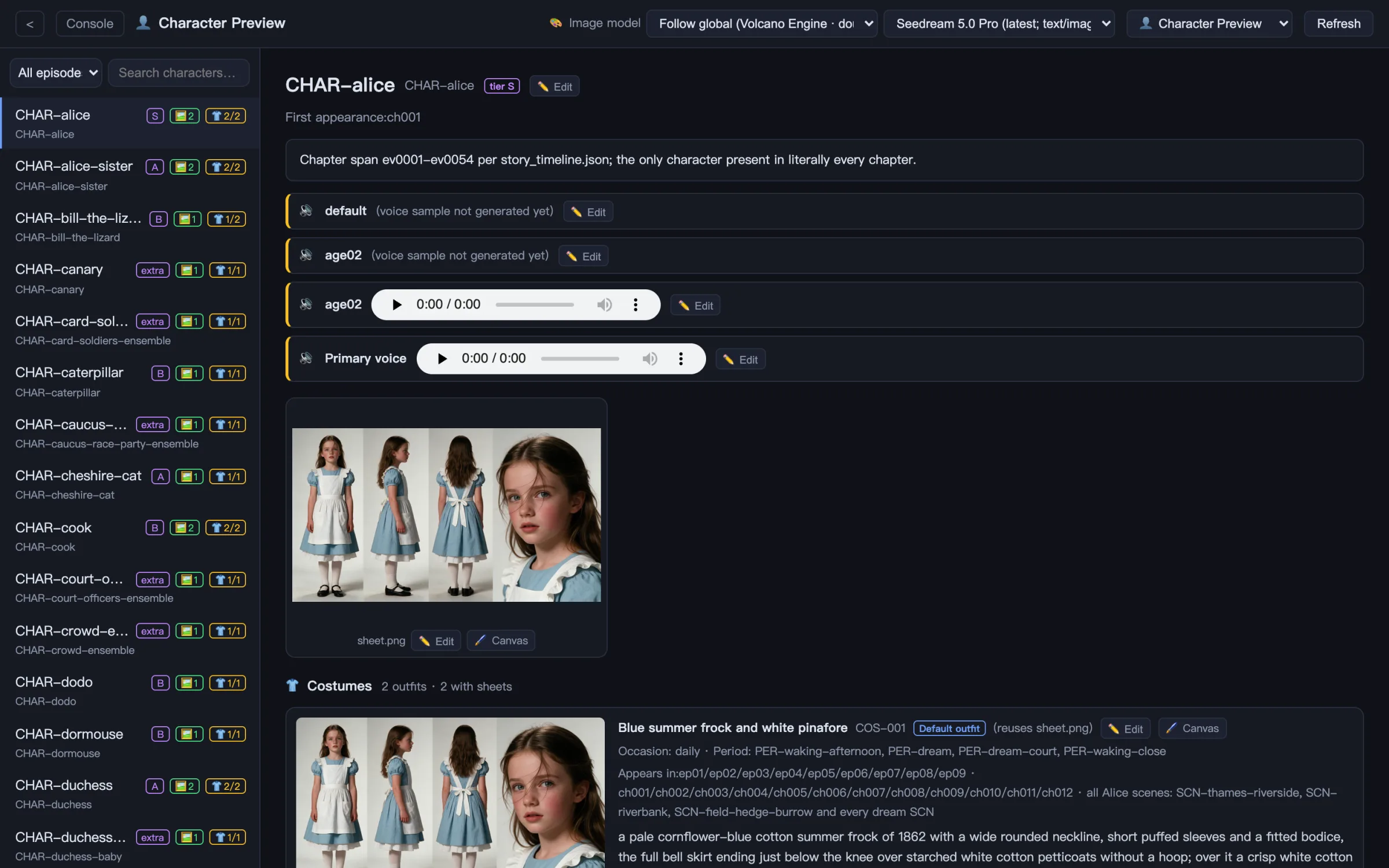
The list on the left shows every character with badges: the tier, 🖼 with the number of images, and 👕 with how many costume sheets are drawn out of the total. Characters with images and profiles come first.
- Search characters… matches IDs, names and aliases.
- The episode menu next to it (All episodes,
ep01,ep02…) shows only the characters who appear in that episode. The same choice applies on the scene, creature and prop preview pages.
The details on the right, from top to bottom:
- Name, ID, tier and ✏️ Edit, then aliases, first appearance and notes.
- The character's voices, with a player for each voice sample. See Voices.
- The images: the character sheet and other images in the character's folder. Subfolders such as
candidates/appear as folder cards; click one to open it and ← Back to return. Click an image to see it full size. - 👕 Costumes: every outfit with its sheet. See Costumes.
- The profile, one foldable section per file: Appearance design, Personality, Dialogue style, Voice/voice-over, Age version.
If narration is turned on for the project, a 🎙 Narration entry is pinned to the top of the list for the narrator's voice.
Image model for character images
🎨 Image model at the top of the page sets the channel and model used when character sheets and costume sheets are drawn. Follow global uses the image setting on the 🎨 Generation Models page. The choice is saved for this page only. See Image models.
Ask for a change
- ✏️ Edit next to the name sends revision notes about the character's profile to the Reviser.
- ✏️ Edit under an image sends notes about that image, for example "her hair should be darker and longer". The Reviser updates the profile and redraws the image as needed.
- 🖌 Canvas under an image opens it in the Canvas to mark exactly what to change, keep every version and pick the final one yourself.
Each ✏️ Edit opens a Revision notes box with the target already filled in. Write what should change and click Send. See The Reviser and revision notes.
TIP
When you change how a character looks on the Canvas, tick the option to send the change to the Reviser when you set the final version. Otherwise the profile still describes the old look, and the next redraw will bring it back.
Virtual Portrait Library
If the Virtual Portrait Library is turned on (⚙️ → Advanced → Virtual Portrait Library), each image gets a ⬆ Register button. Registered images are sent to Volcengine video models as asset IDs, which avoids rejections of reference images that show faces. See Virtual avatar library.