Language models and smart assignment
The language model is the model an agent thinks with while it writes, plans and checks work. You can run every agent on one model, let Smart Assignment split agents into a stronger and a cheaper tier, or give single agents their own engine and model.
This page is about the language model behind agents. Image, video, voice and music models are set on the Generation Models page; see Image models and the other pages in this section.
Pick the language model
In the console's top bar, open Language Model. Its list depends on the Engine next to it:
| Choice | What it does |
|---|---|
| Smart Assignment | Each agent gets the high-tier or low-tier model of this engine, depending on how demanding its job is. The default for every engine except agentics |
| A model name | Every agent without its own setting uses this model |
| Default (CLI config) | No model is passed; the engine program uses the model in its own configuration |
| Custom… | Type any model ID the engine accepts |
The model names come from the engine program where possible (for example pi --list-models or opencode models), so they reflect what your account can use. On the agentics engine the menu works differently; see The built-in Agentics engine.
WARNING
Changing the engine or the language model in the top bar re-syncs every agent and clears the models you set on single agents with their Model button.
Smart Assignment
Smart Assignment sorts agents into two tiers:
- High tier (creative core): orchestration, story, characters, scenes, art and directing, the teams of the project types (audio to video, mashup, digital human, motion graphics), plus the World Agent, the Reviser, the Prompt Agent and the Video Generation Agent.
- Low tier (others): QA reviews, worldbuilding, creatures, audio, editing, publishing and the rest of video generation, plus indexing and mechanical jobs: the Evaluation Agent, event and timeline extraction, the character index, aspect-ratio rules, the Canvas Retouch Agent and the Canvas Video Agent.
Built-in models for each engine:
| Engine | High tier | Low tier |
|---|---|---|
| claudecode | opus (latest) | sonnet (latest) |
| codex | gpt-6.1-sol | gpt-6.1-terra |
| kimicode | kimi-code/k3 | kimi-code/kimi-for-coding |
| pi | openai-codex/gpt-6.1-sol | openai-codex/gpt-6-luna |
| opencode | opencode-go/deepseek-v4-pro | opencode-go/deepseek-v4.1-flash |
| grok | grok-4.7 | grok-4.6 |
| antigravity | gemini-4-argon-high | gemini-3.8-flash-medium |
Hover over Smart Assignment in the menu to see the two models in use.
Change the two tiers
- Select Smart Assignment in Language Model.
- Click the sliders button to the right of the menu. The ⚙ Smart Assignment models dialog opens for the current engine.
- Pick a model for High tier (creative core) and Low tier (others). The built-in choice is marked Default, and the line under each menu shows how many agents are in that tier.
- Click Save.
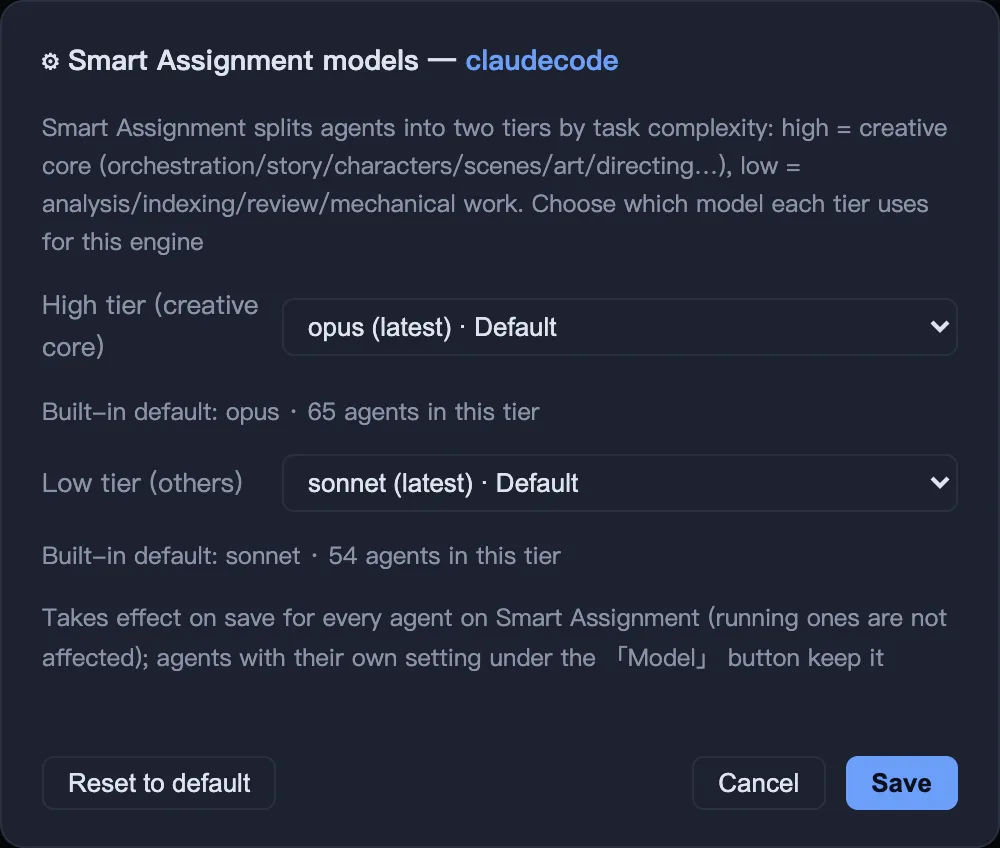
The new tiers apply at once to every agent on Smart Assignment. Running tasks are not affected, and agents with their own setting keep it. When a tier differs from the built-in model, the sliders button gets an outline.
Reset to default puts both tiers back to the built-in models. If you save a tier that equals the built-in model, it keeps following the built-in choice when a later VideoAgents release changes it.
Give one agent its own model
- Select the agent in the left column.
- Click Model at the top of the chat. The button shows what the agent uses now, for example Model · claude·opus.
- In the 🧠 Agent Model Config dialog, pick an Engine and a Language Model. Follow global (top right) keeps the top-bar engine.
- Click Save.
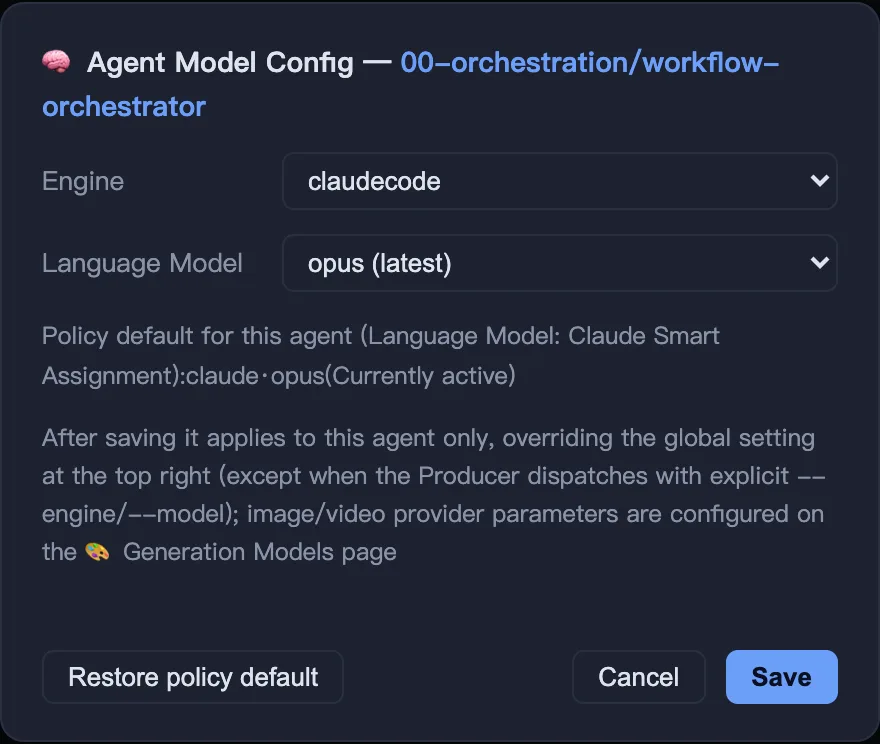
The dialog also shows the agent's policy default, the model it would get from the top bar. The agent's own setting wins over the top bar, except when the Workflow Orchestrator dispatches a task with an explicit engine or model. Restore policy default removes the agent's own setting.
This dialog only sets the engine and language model. Image and video providers are always the ones on the Generation Models page.
Good to know
- Each run in the Run Panel shows the engine and model it used.
- The Thinking effort setting under ⚙️ → Advanced → Agent Advanced Settings applies to every agent, whichever model it runs on.
- Smart Assignment is the simplest way to save money on language models: review and indexing jobs don't need the most capable model. See Cost control.
Troubleshooting
The sliders button is missing. It only appears while Smart Assignment is selected, and the agentics engine has no Smart Assignment.
An agent keeps using an old model. It has its own setting. Open its Model dialog and click Restore policy default.
A model in the list fails with "model unavailable". Your engine account can't use that model. Pick another one, or choose Custom… and enter a model ID your account supports.