Voice input
Voice input adds a microphone button to the console's input box and to the Revise popup on preview pages. Click it, speak, and your words are typed in for you. The recording is transcribed on your own computer by the faster-whisper model: the audio never leaves the machine and no API key is needed.
Turn it on
- Open ⚙️ → Advanced → Voice input.
- Tick Enable voice input.
- Pick a Recognition model and click ⬇ Download model if it shows "not downloaded".
- Wait for ✓ Model ready to use, then click Close.
Changes in this dialog are saved as soon as you make them.
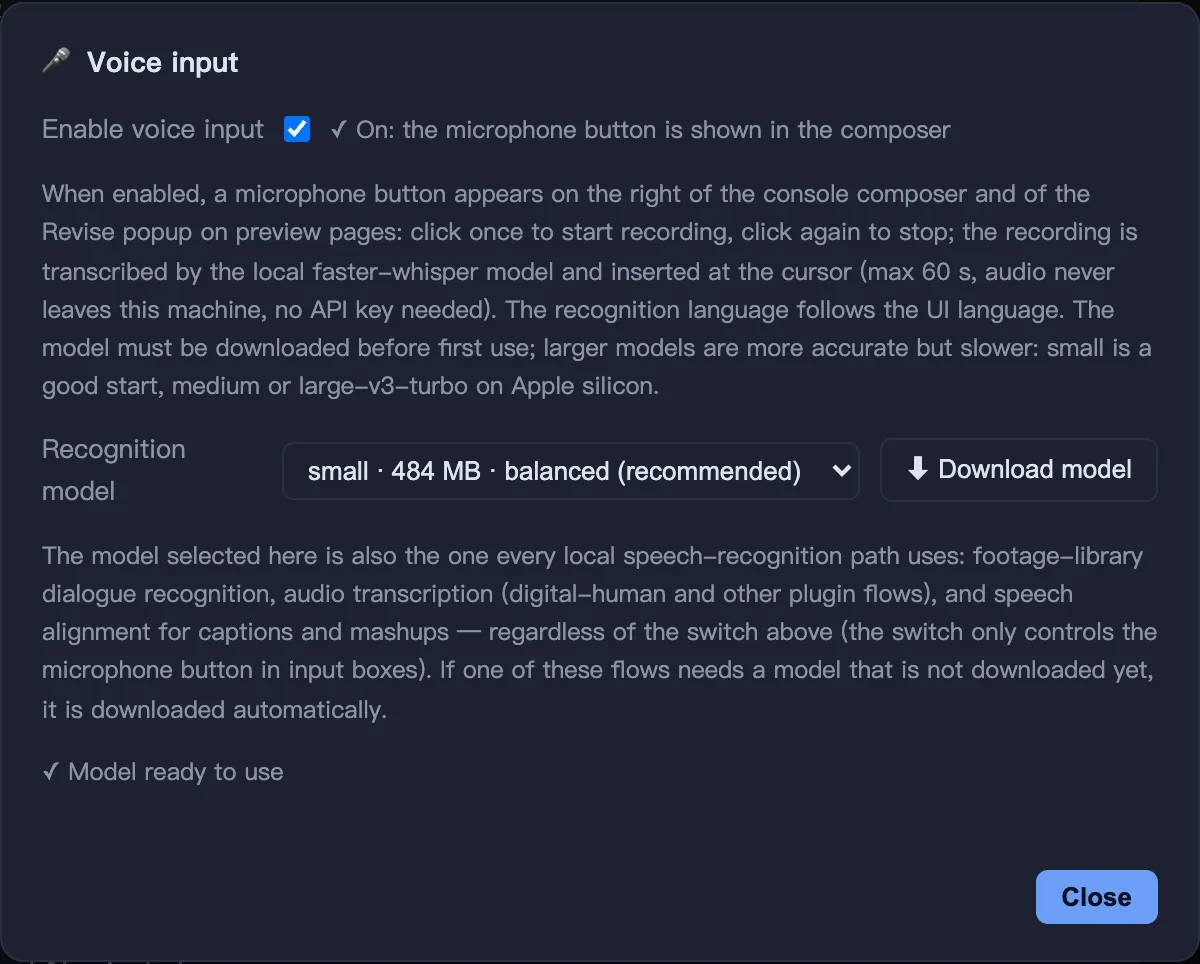
The download goes into data/models/faster-whisper/ on this computer. You can close the dialog while it downloads; it continues in the background.
Choose a model
| Model | Size | Notes |
|---|---|---|
| tiny | 75 MB | Fastest, lowest accuracy |
| base | 145 MB | Fast, moderate accuracy |
| small | 484 MB | Balanced (recommended) |
| medium | 1.5 GB | Slower, high accuracy |
| large-v3-turbo | 1.6 GB | Near large-v3 accuracy, much faster |
| large-v3 | 3.1 GB | Slow, highest accuracy |
Start with small. On Apple silicon, medium or large-v3-turbo works well.
The model you pick here is also used by every other local speech recognition in VideoAgents: dialogue recognition in the footage library, audio transcription for digital-human and other flows, and speech alignment for captions and mashups. That holds even with voice input switched off; the switch only controls the microphone button. If one of those flows needs a model that is not downloaded yet, it downloads it automatically.
Dictate
- Click the microphone at the bottom-right of the input box. It turns red while recording.
- Speak.
- Click it again to stop. A recording stops by itself after 60 seconds.
The text is inserted where the cursor is. Read it over, then send.

The recognition language follows the interface language. To dictate in another language, switch the interface language.
Troubleshooting
| Message | What to do |
|---|---|
| Microphone permission denied | Allow microphone access for the browser or the desktop app in your system settings |
| No microphone found | Connect or select a microphone |
| Recording requires HTTPS or a localhost address | Browsers only allow recording on secure pages. Open the console at localhost or 127.0.0.1, or use the desktop app. |
| No speech recognized | The recording was too short or silent. Speak closer to the microphone and try again. |
| ffmpeg not found; recordings cannot be decoded | Install ffmpeg on the computer running VideoAgents |
| Model not downloaded | Download it in ⚙️ → Advanced → Voice input |