Resource usage
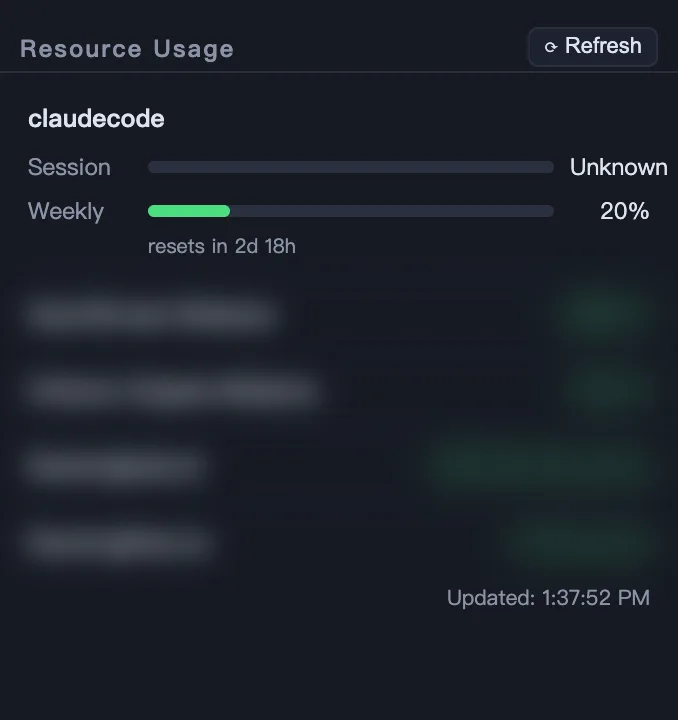
The Resource Usage panel under the Run Panel shows how much of your agent engine's quota you have used and how much money is left with your providers. Check it before a long run so a production does not stop halfway because a quota or balance ran out.
What the panel shows
Engine usage. For each engine with a usage check, two bars:
- Session: the current usage window (the 5-hour window for Claude Code, Codex and OpenCode Go).
- Weekly: the weekly window.
The bar turns yellow at 60% and red at 85%. Under the bar you see when the window resets, for example "resets in 2d 18h". Unknown means the reading could not be taken.
The engine selected in the top bar is shown automatically. Selecting pi shows Codex usage, because pi usually runs on a ChatGPT subscription.
Balances. One line per configured account:
| Line | Shown when |
|---|---|
| Agentics Balance | You are signed in to the desktop app (in yuan for the shumati.cn build, in dollars for the agentics.world build) |
| OpenRouter Balance | An OpenRouter Management Key is set |
| Volcano Engine Balance | The Volcengine balance check is on |
| RunningHub.ai, RunningHub.cn | The RunningHub balance check is on; one line per site with a key, in RH points |
The panel refreshes every 10 minutes. Click ⟳ Refresh to read everything again now. Updated: shows the time of the last reading.
Turn on usage checks and balances
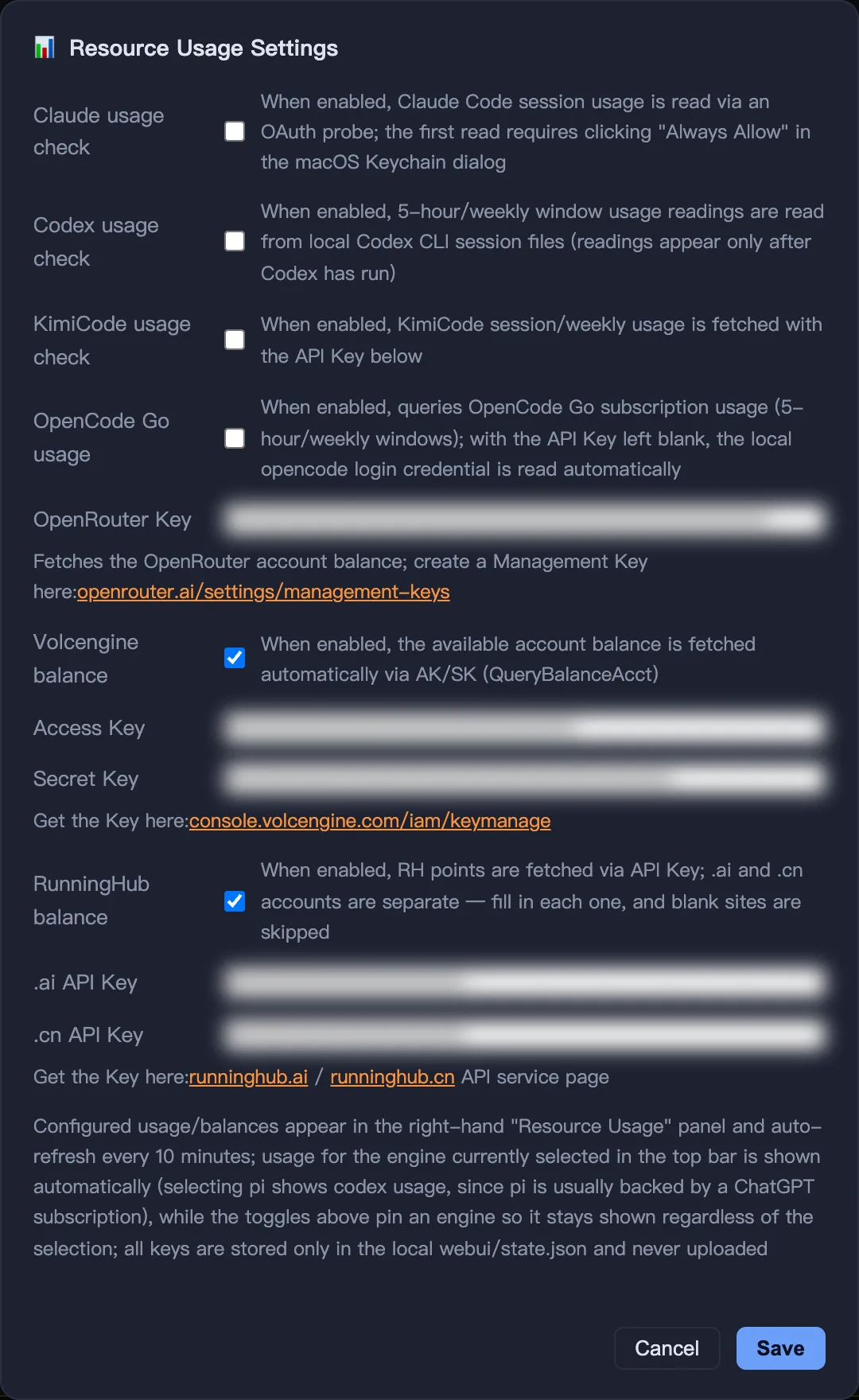
- Open ⚙️ → Resource Usage.
- Tick the checks you want and enter the keys.
- Click Save. The panel refreshes right away with the new settings.
| Setting | What it does |
|---|---|
| Claude usage check | Reads Claude Code session usage. On macOS the first reading opens a Keychain prompt; click Always Allow. If the environment variable VIDEOAGENTS_ENABLE_CLAUDE_USAGE_PROBE is set, the check is always on and this switch has no effect. |
| Codex usage check | Reads the 5-hour and weekly readings from the local Codex CLI session files. Readings appear only after Codex has run. |
| KimiCode usage check and Kimi API Key | Fetches KimiCode session and weekly usage. Leave the key blank to use your local kimi login. Create a key at kimi.com/code/console. |
| OpenCode Go usage and OpenCode API Key | Fetches OpenCode Go subscription usage (5-hour and weekly). Leave the key blank to use your local opencode login. |
| OpenRouter Key | A Management Key (sk-or-…) to read your OpenRouter balance. Leave it blank to skip. Create one at openrouter.ai/settings/management-keys. |
| Volcengine balance, Access Key, Secret Key | Reads the available balance of your Volcengine account. Both keys are required. Get them at console.volcengine.com/iam/keymanage. |
| RunningHub balance, .ai API Key, .cn API Key | Reads your RH points. runninghub.ai and runninghub.cn are separate accounts: fill in a key for each site you use; at least one is required. |
All keys stay on your computer, in the app's local webui/state.json. They are never uploaded.
Your Agentics account
In the desktop app, ⚙️ → Account shows your account ID and balance and lets you sign in or out. The app restarts after you sign in or out. The Agentics Balance line in the panel does not depend on the Resource Usage settings.
How usage connects to auto-run
Auto-run uses the session usage of the Workflow Orchestrator's engine: when it reaches the threshold you set, auto-run skips that round. See Auto run.