Agent advanced settings
These settings control how agents run: how many at once, how long a task may take, how often failed work is redone, and how much each agent remembers. The defaults suit most machines and subscriptions. Change them when you hit limits, for example tasks timing out or quota running out too fast.
Open ⚙️ → Advanced → Agent Advanced Settings, change the values and click Save. All settings are global (every project) and apply to runs started after you save; Debug mode applies at once. Click i next to a field for its explanation in the dialog.
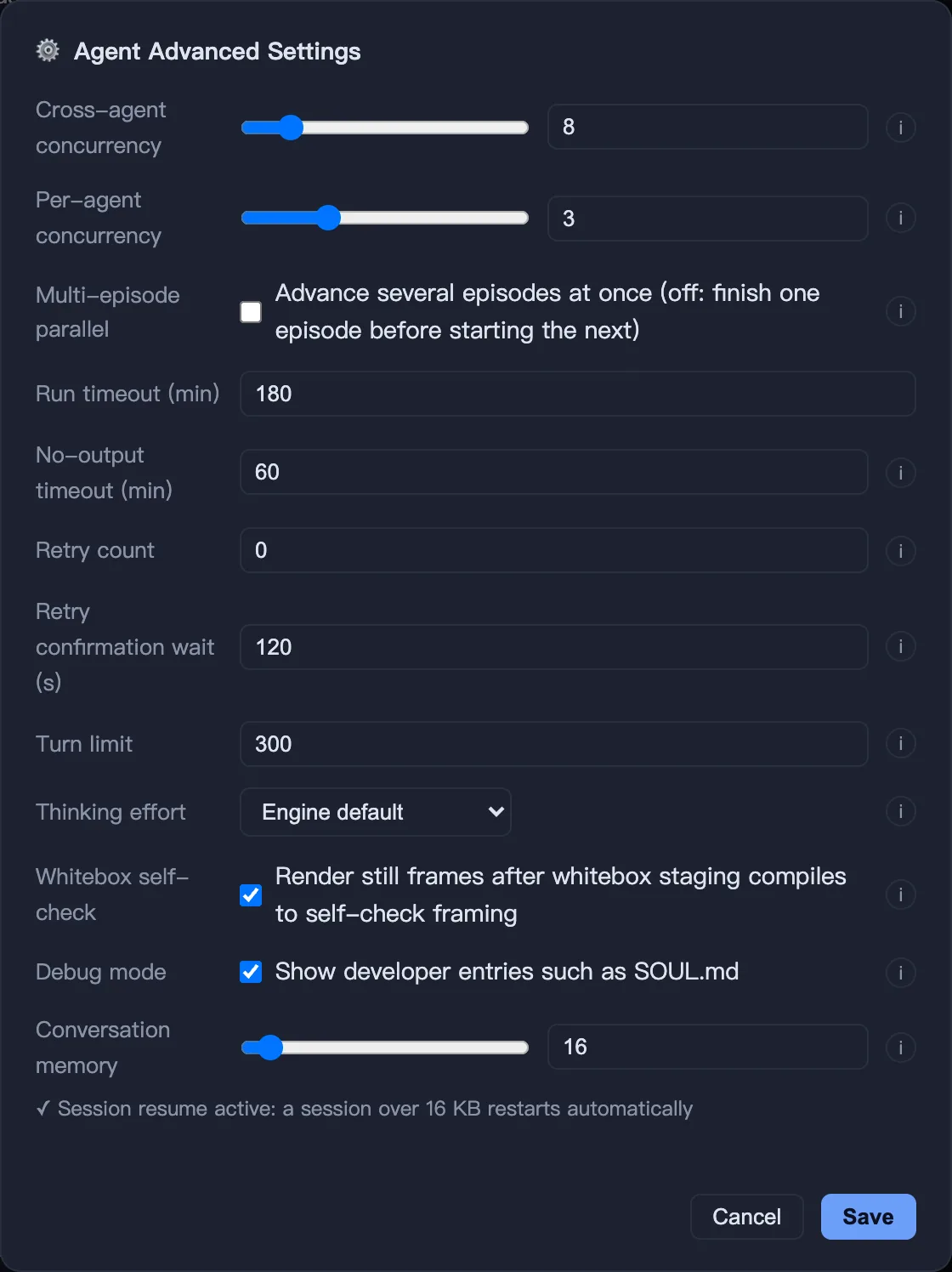
Concurrency
| Field | What it does | Range | Default |
|---|---|---|---|
| Cross-agent concurrency | How many tasks may run at the same time across all agents and projects. New tasks wait for a free slot. Dispatching agents such as the Workflow Orchestrator, which mostly wait for their sub-tasks, do not take a slot. It is also the upper limit of Per-agent concurrency. | 1–50 | 8 |
| Per-agent concurrency | How many tasks one fan-out agent may run at once. Fan-out agents work per scene or per group, such as scene assets, video generation, QA and scoring. Creative agents always run one task at a time to keep their conversation continuous. | 1–8, never above cross-agent | 5 |
| Multi-episode parallel | Off: the team works on one episode at a time and starts the next only when every step of the current one, including its sign-offs, is done (publishing excluded). On: after the first episode has gone through the whole pipeline and been signed off at gate H4, later episodes can move forward together. | On / off | Off |
Each slot is a real engine process. Raising concurrency uses quota faster, loads your computer more, and makes dropped proxy connections more likely. Raise it step by step.
With Multi-episode parallel off, work inside an episode still runs in parallel (groups, shots, scenes), at the speed the concurrency limits allow. If the current episode stops at a sign-off or is held or blocked, later episodes do not start; auto-run reminds you when it is on. Turning it on raises throughput, but also token use, running processes, and the amount of work waiting for your review.
Timeouts and turns
| Field | What it does | Range | Default |
|---|---|---|---|
| Run timeout (min) | Longest time a single task may run. When reached, the task and its child processes are ended and marked as an error. The Workflow Orchestrator, which waits for the whole pipeline, gets four times this value. | 10–1440 | 120 |
| No-output timeout (min) | How long the engine may go without any output before the task is considered stuck and ended. It catches hung connections and proxy drops much earlier than the run timeout. 0 turns it off. The Workflow Orchestrator is exempt. | 0–360 | 30 |
| Turn limit | Most conversation turns the engine may take in one work order. Only the claude and grok engines have such a limit; other engines ignore it. | 10–1000 | 250 |
TIP
The engine prints nothing during a single tool call, so the no-output timeout must be longer than the longest tool call in a task, such as one long video render.
When the turn limit is hit, the engine is cut off and the task cannot resume; files already written stay, but checks and the receipt are missing. If tasks that handle dozens of groups hit the limit, first ask for smaller batches, then raise the value.
Retries and confirmations
| Field | What it does | Range | Default |
|---|---|---|---|
| Retry count | How many times agents may redo work on their own: sending work back after a failed score, QA review or machine check, and regenerating images and videos that fail checks. When a task has used up its retries and still fails, it is handed to you. 0 = no automatic retries; the first failure goes to you. | 0–10 | 0 |
| Retry confirmation wait (s) | How long a retry-type confirmation card (such as Rerun / Skip) waits. When the countdown ends, the default option is applied, so the pipeline never stalls. An agent may ask for a shorter wait, never a longer one. Sign-off cards never count down. | 5–3600 | 60 |
Retry count is the same setting as the /retry command. See Chat commands.
WARNING
Each retry runs the agent, and often a generation model, again. A higher retry count can cost more engine quota and generation credits.
Thinking and memory
| Field | What it does | Range | Default |
|---|---|---|---|
| Thinking effort | Reasoning depth for every agent, passed to each engine's own setting. Deeper is more reliable but slower and uses more tokens. Engine default sends nothing and keeps each engine's own configuration. | Engine default, low, medium, high, xhigh, max | Engine default |
| Conversation memory | Size limit, in KB, of a creative agent's conversation history. Creative agents resume their previous session on each run; once a session grows past this size, a new one starts. 0 turns memory off: every run starts fresh and information passes only through the project files. | 0–256 KB | 16 KB |
How Thinking effort maps to each engine: claude and antigravity use --effort; codex uses model_reasoning_effort and grok --reasoning-effort (both map max to xhigh); pi and agentics use --thinking (not sent to local models); opencode uses --variant (ignored when the model has no such variant). The kimi engine has no such setting.
A larger Conversation memory keeps longer continuity, but each turn resends the whole history, which is slower and costs more tokens. Setting it to 0 saves tokens noticeably. Session IDs are still saved, so raising the value again resumes from the latest session. The line under the slider shows whether session resume is on. To reset one agent's session, send /clear in its chat.
Whitebox and Debug mode
| Field | What it does | Default |
|---|---|---|
| Whitebox self-check | After the whitebox staging agent builds or edits a group, it renders still frames of each shot (start, middle, end and a spatial view) into one contact sheet per group, and checks them for framing, blocked views, facing and shot size before handing over to you. Rendering is local and not billed; it adds about ten seconds per group plus the tokens to read one image. Off: only numeric checks run. | On |
| Debug mode | Shows developer entries, such as the SOUL.md button in each agent's chat header. Takes effect when you save and does not affect any run. | Off |
See 3D whitebox previs.