Cost control
VideoAgents uses your own engine and provider accounts, so every model call is billed to you. The workflow is built to spend late: review happens at the steps that cost nothing, paid generation starts after you sign off, and finished work is reused instead of generated again. This page collects the settings that affect cost and shows where to watch spending.
Where the money goes
| Step | Billed by | Set on |
|---|---|---|
| Agents thinking and writing | Your engine subscription or language-model provider | Top bar Engine and Language Model |
| Images (sheets, scenes, plates, keyframes, sketches) | The image provider | 🖼 Image Model |
| Video clips (usually the largest cost) | The video provider | 🎬 Video Model |
| Voices, music, sound effects | The voice, music and SFX providers | 🎙 TTS Voice Model, 🎵 Music Model, 🔊 SFX Model |
| Upscaling, digital humans, 3D models, world models | Each card's provider | Their cards on ⚙️ → Generation Models |
Habits the workflow already follows
- Review before paying. The screenplay preview, storyboard sketches and the animatic let you catch problems before any video is generated. Paid video generation waits for your sign-off, and a sign-off is marked stale when something upstream changes. See Sign-off gates.
- Draft first, upscale later. Clips are generated at the draft resolution and only the approved ones are brought up to the final resolution. See Upscale.
- Reuse before regenerating. Character sheets, scene images and prop references are reused by reference in later shots instead of being drawn again for each shot.
- No automatic reruns by default. The Retry count is 0, so a failed check is handed to you instead of being regenerated on its own. Raise it under ⚙️ → Advanced → Agent Advanced Settings or with
/retry N(0–10). See Chat commands. - Cheaper models for simple jobs. Smart Assignment gives review, indexing and mechanical jobs the engine's cheaper model. See Language models and smart assignment.
Settings that change the bill
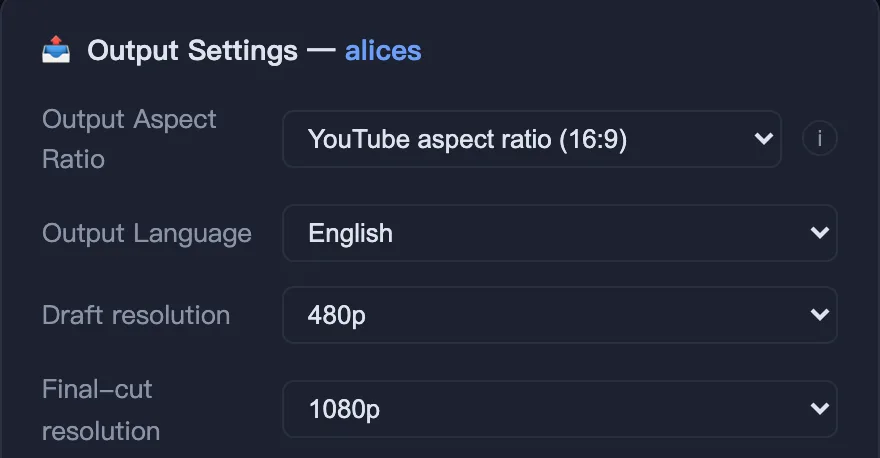
🎛️ → Output Settings (per project):
- Draft resolution and Final-cut resolution. Higher resolution costs more video generation. Keep the draft low (480p is the lowest) and let the final come from upscaling.
- Background plate mode: with Nine-grid, auto fill-in, every plate that no grid cell fits is generated as one more image. Nine-grid, manual fill-in generates nothing extra; you capture missing plates yourself on the Scene Preview page.
🎛️ → Model Limits (per project): the group duration and reference limits should match the video model, so generations don't fail and get retried. See Model limits.
🔍 Upscale: ffmpeg is free. With Seedance 2.5 on Volcano Engine, draft mode makes the 1080p final from the approved 480p draft, so the draft costs the same as a normal 480p clip.
🎨 Image model on preview pages: give storyboard sketches their own cheap, fast model on the Storyboard page. See Image models.
⚙️ → Auto-Run: auto-run skips a round when the Workflow Orchestrator's engine has used more of its session window than the usage threshold (80% by default). See Auto-run.
ComfyUI on RunningHub: higher Instance type tiers cost more per second.
Options that cost nothing
| Option | Where |
|---|---|
| Code composition for music and Code SFX for sound effects | Music Model and SFX Model cards |
| Openverse search for existing free sound effects | SFX Model card |
| ffmpeg upscaling | Upscale card |
| A local language model (LM Studio, Ollama, vLLM…) | Language Model / Agentics card, Local model |
| Local ComfyUI workflows on your own GPU | Any ComfyUI tab, Local run mode |
| Local Hunyuan3D and HunyuanWorld servers | 3D models and World model cards |
Running locally needs suitable hardware and the model files; the ComfyUI templates list what each one needs.
See what you have spent
Run Panel. Each run shows its duration, and its cost and tokens when the engine reports them.
Resource Usage. The panel on the right of the console shows your engine's session and weekly usage and the balances of OpenRouter, Volcano Engine and RunningHub. Turn each check on and enter its keys under ⚙️ → Resource Usage; the panel refreshes every 10 minutes. See Resource usage.
Workflow Preview. The summary bar shows the time spent, the time remaining and the project's totals for Language tokens used, Video tokens used and Image tokens used, including rerolls.

Files. When a provider reports token usage for an image or clip, it is added to usage_ledger.jsonl in the output folder, which keeps the history even when a file is regenerated. These records feed the Workflow Preview totals.
Good to know
- An interrupted Fal job is picked up when the same generation runs again, so it is not billed twice.
- Test on the Moderation model card makes one real, billed call (about $0.00003).
- Provider prices change. Check each provider's own pricing page.